beast_file <- system.file("examples/MCC_FluA_H3.tree", package="ggtree")
beast_tree <- read.beast(beast_file)
ggtree(beast_tree, aes(color=rate)) +
    scale_color_continuous(low='darkgreen', high='red') +
    theme(legend.position="right")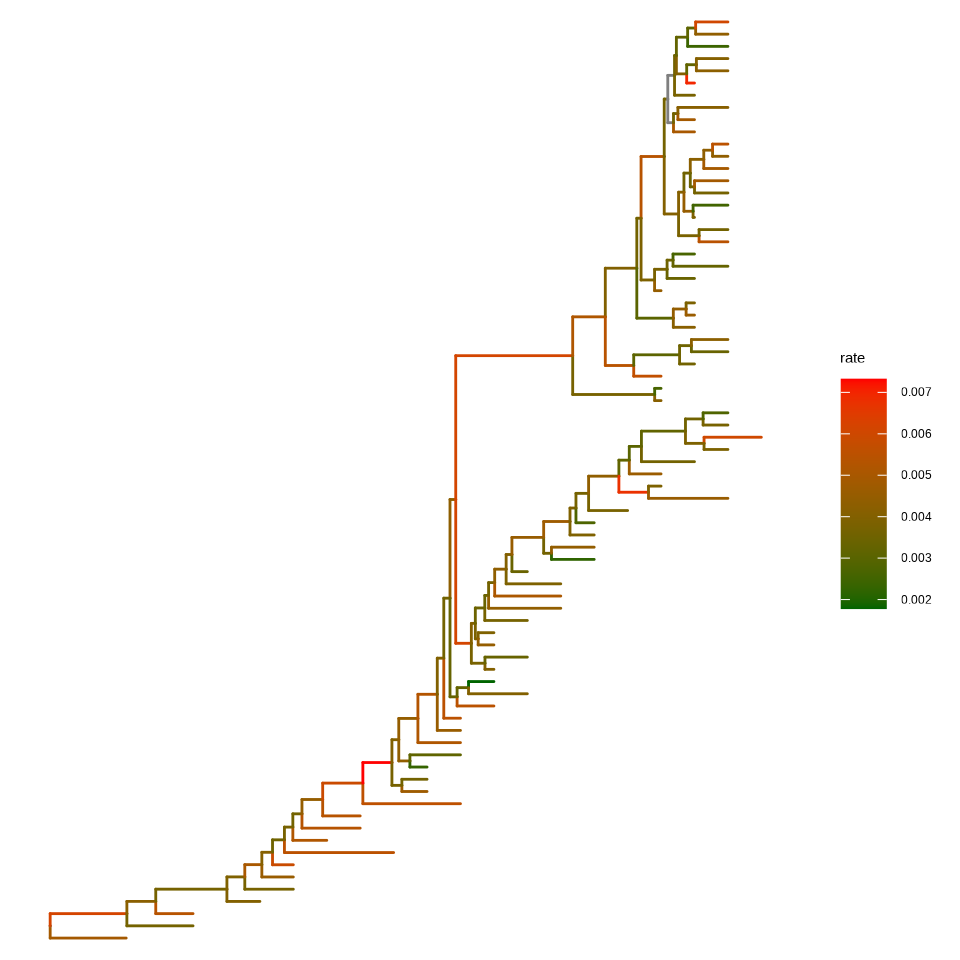
Beyond displaying the tree structure itself, ggtree allows mapping data associated with the tree to visual properties such as edge color and branch length scale, customizing every component of the theme, and presenting multiple trees together.
In ggtree (Yu et al., 2018), coloring phylogenetic tree is easy, by using aes(color=VAR) to map the color of the tree based on a specific variable (both numerical and categorical variables are supported, see Figure Figure 6.1).
beast_file <- system.file("examples/MCC_FluA_H3.tree", package="ggtree")
beast_tree <- read.beast(beast_file)
ggtree(beast_tree, aes(color=rate)) +
scale_color_continuous(low='darkgreen', high='red') +
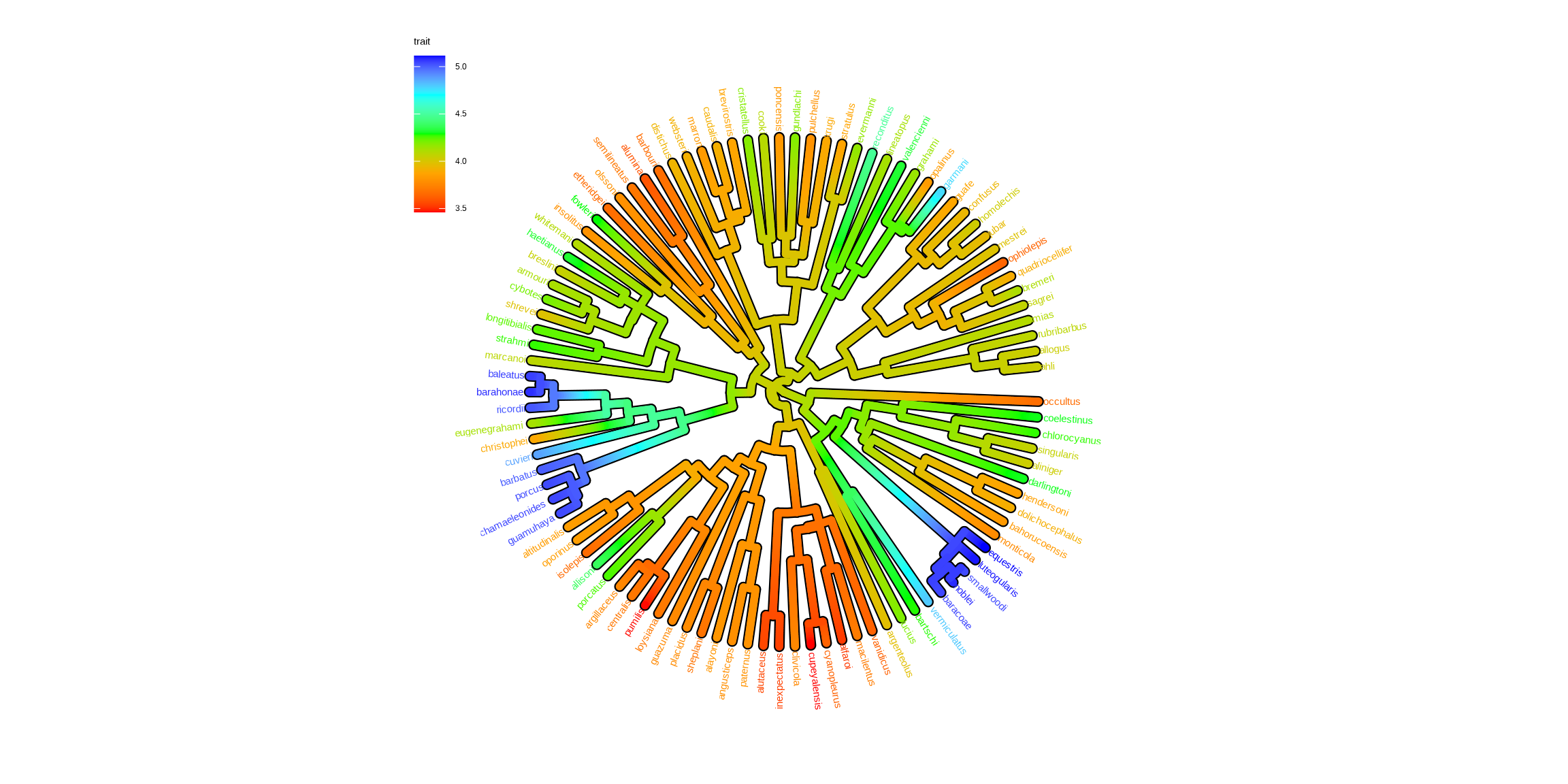
theme(legend.position="right")Users can use any feature (if available), including clade posterior and dN/dS, etc., to scale the color of the tree. If the feature is a continuous numerical value, ggtree provides a continuous parameter to support plotting continuous state transition in edges. Here, we use an example1 to demonstrate this functionality (Figure Figure 6.2 (a)). If you want to add a thin black border in tree branches, you can place a tree with black and slightly thicker branches below your tree to emulate edge outlines as demonstrated in Figure Figure 6.2 (b).
library(ggtree)
library(treeio)
library(tidytree)
library(ggplot2)
library(TDbook)
## ref: http://www.phytools.org/eqg2015/asr.html
##
## load `tree_anole` and `df_svl` from 'TDbook'
svl <- as.matrix(df_svl)[,1]
fit <- phytools::fastAnc(tree_anole, svl, vars=TRUE, CI=TRUE)

td <- data.frame(node = nodeid(tree_anole, names(svl)),
               trait = svl)
nd <- data.frame(node = names(fit$ace), trait = fit$ace)

d <- rbind(td, nd)
d$node <- as.numeric(d$node)
tree <- full_join(tree_anole, d, by = 'node')

p1 <- ggtree(tree, aes(color=trait), layout = 'circular',
        ladderize = FALSE, continuous = 'colour', size=2) +
    scale_color_gradientn(colours=c("red", 'orange', 'green', 'cyan', 'blue')) +
    geom_tiplab(hjust = -.1) +
    xlim(0, 1.2) +
    theme(legend.position = c(.05, .85))

p2 <- ggtree(tree, layout='circular', ladderize = FALSE, size=2.8) +
    geom_tree(aes(color=trait), continuous = 'colour', size=2) +
    scale_color_gradientn(colours=c("red", 'orange', 'green', 'cyan', 'blue')) +
    geom_tiplab(aes(color=trait), hjust = -.1) +
    xlim(0, 1.2) +
    theme(legend.position = c(.05, .85))

p1
p2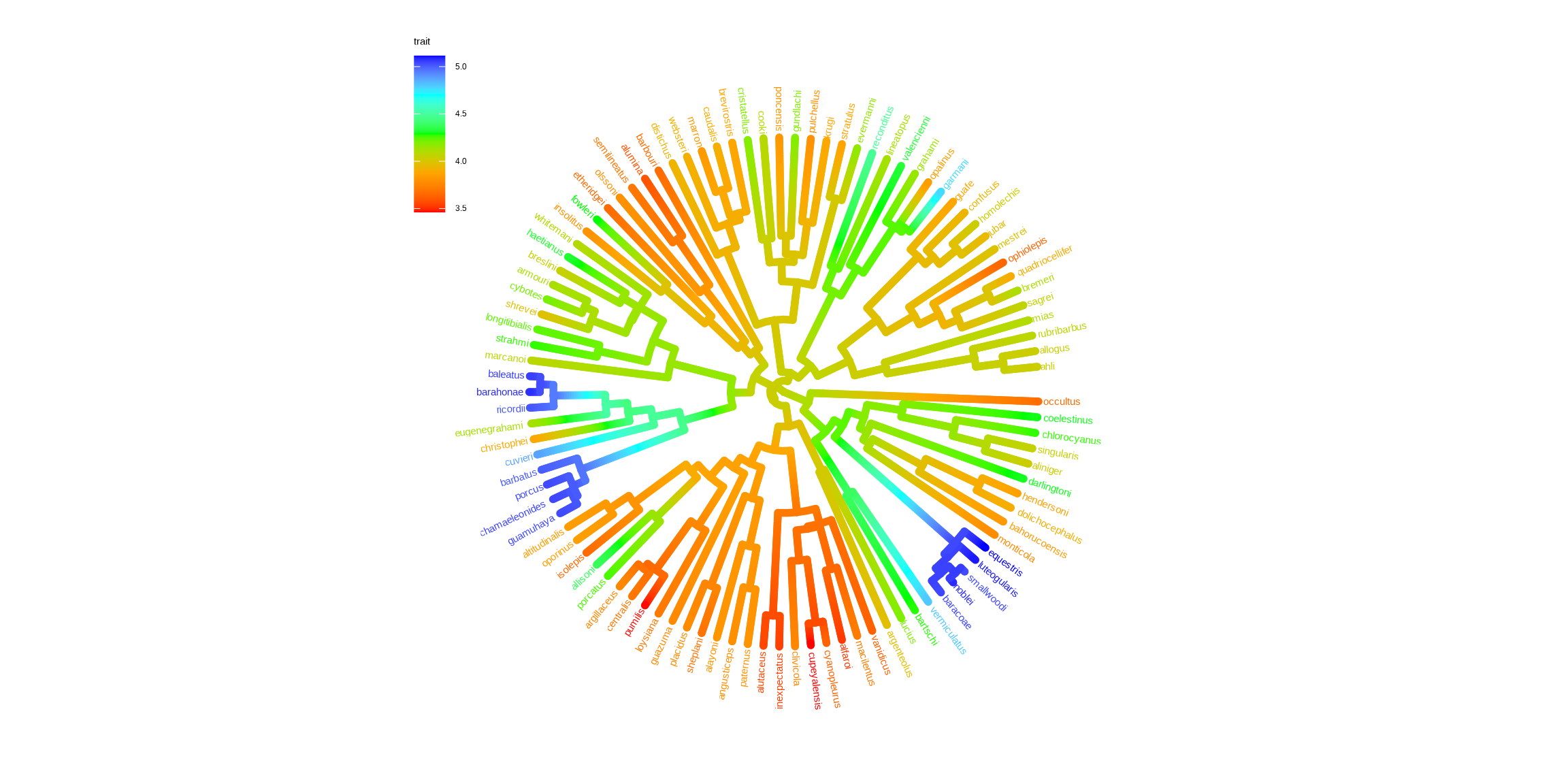
Besides, we can use a two-dimensional tree (as demonstrated in Figure Figure 5.8) to visualize phenotype on the vertical dimension to create the phenogram Figure Figure 6.3. We can use the ggrepel package to repel tip labels to avoid overlapping as demonstrated in Figure Figure 1.4.
ggtree(tree, aes(color=trait), continuous = 'colour', yscale = "trait") +
    scale_color_viridis_c() + theme_minimal()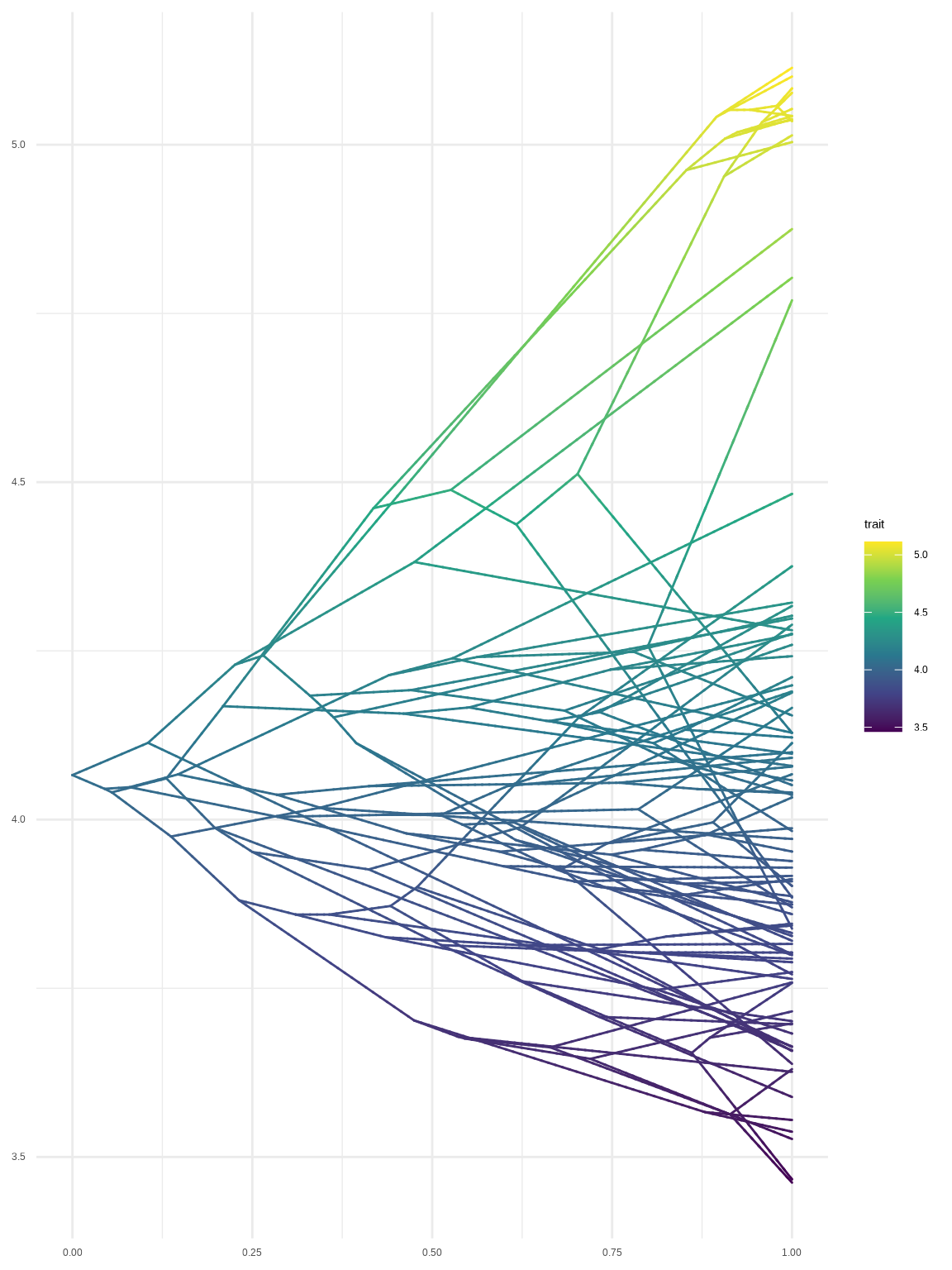
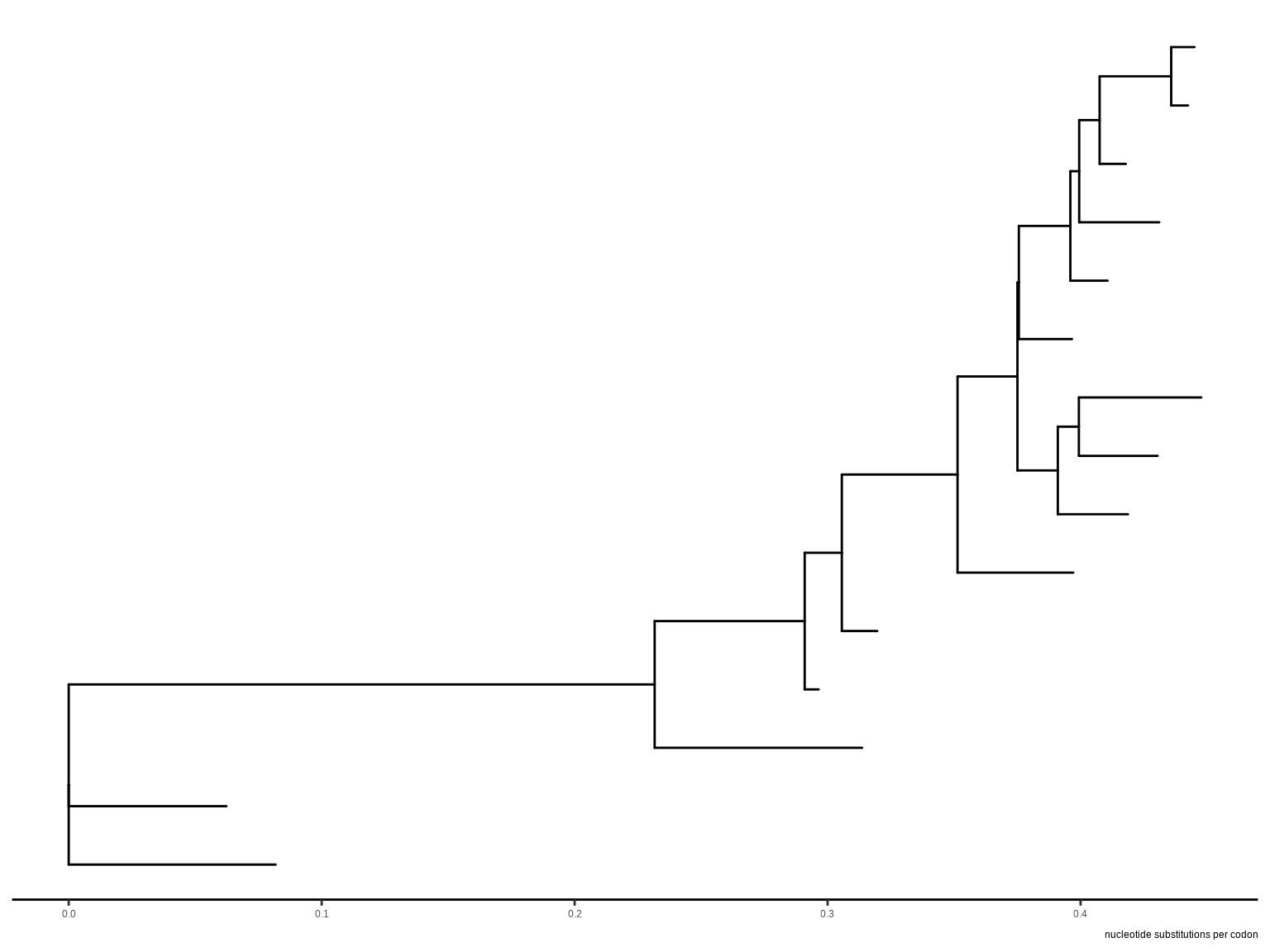
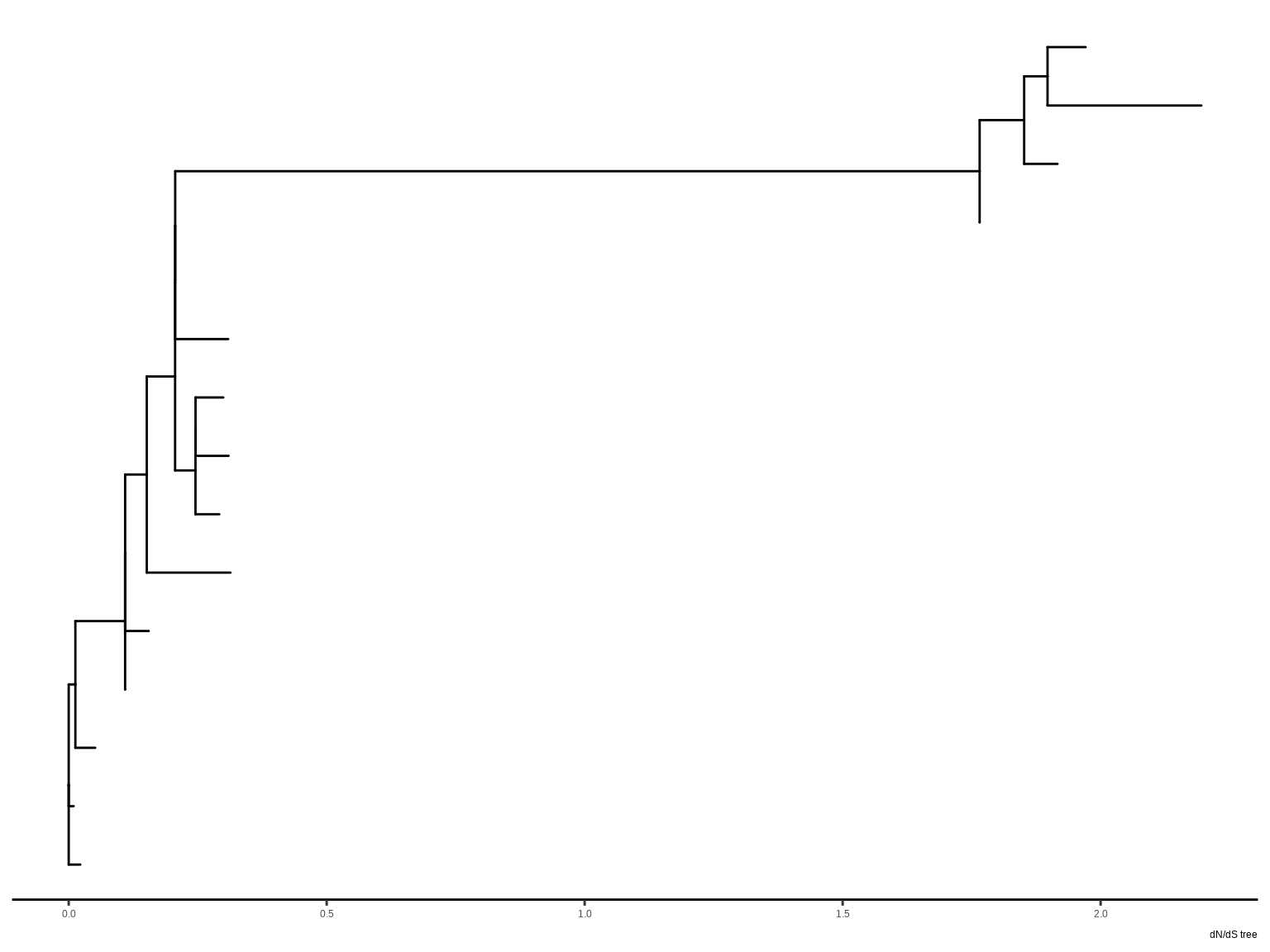
Most of the phylogenetic trees are scaled by evolutionary distance (substitution/site). In ggtree, users can rescale a phylogenetic tree by any numerical variable inferred by evolutionary analysis (e.g., dN/dS).
This example displays a time tree (Figure Figure 6.4 (a)) and the branches were rescaled by substitution rate inferred by BEAST (Figure Figure 6.4 (b)).
library("treeio")
beast_file <- system.file("examples/MCC_FluA_H3.tree", package="ggtree")
beast_tree <- read.beast(beast_file)
beast_tree
'treedata' S4 object that stored information
of
'/home/runner/work/_temp/Library/ggtree/examples/MCC_FluA_H3.tree'.
...@ phylo:
Phylogenetic tree with 76 tips and 75 internal nodes.
Tip labels:
A/Hokkaido/30-1-a/2013, A/New_York/334/2004, A/New_York/463/2005,
A/New_York/452/1999, A/New_York/238/2005, A/New_York/523/1998, ...
Rooted; includes branch length(s).
with the following features available:
'height', 'height_0.95_HPD', 'height_median', 'height_range', 'length',
'length_0.95_HPD', 'length_median', 'length_range', 'posterior', 'rate',
'rate_0.95_HPD', 'rate_median', 'rate_range'.
# The associated data tibble abstraction: 151 × 16
# The 'node', 'label' and 'isTip' are from the phylo tree.
node label isTip height height_0.95_HPD height_median height_range length
<int> <chr> <lgl> <dbl> <list> <dbl> <list> <dbl>
1 1 A/Hokka… TRUE 19 <dbl [2]> 19 <dbl [2]> 2.34
2 2 A/New_Y… TRUE 17 <dbl [2]> 17 <dbl [2]> 1.18
3 3 A/New_Y… TRUE 14 <dbl [2]> 14 <dbl [2]> 0.966
4 4 A/New_Y… TRUE 12 <dbl [2]> 12 <dbl [2]> 1.87
5 5 A/New_Y… TRUE 9 <dbl [2]> 9 <dbl [2]> 2.93
6 6 A/New_Y… TRUE 10 <dbl [2]> 10 <dbl [2]> 0.827
7 7 A/New_Y… TRUE 10 <dbl [2]> 10 <dbl [2]> 0.834
8 8 A/New_Y… TRUE 9 <dbl [2]> 9 <dbl [2]> 1.28
9 9 A/New_Y… TRUE 9 <dbl [2]> 9 <dbl [2]> 0.414
10 10 A/New_Y… TRUE 8 <dbl [2]> 8 <dbl [2]> 0.306
# ℹ 141 more rows
# ℹ 8 more variables: length_0.95_HPD <list>, length_median <dbl>,
# length_range <list>, posterior <dbl>, rate <dbl>, rate_0.95_HPD <list>,
# rate_median <dbl>, rate_range <list>p1 <- ggtree(beast_tree, mrsd='2013-01-01') + theme_tree2() +
labs(caption="Divergence time")
p2 <- ggtree(beast_tree, branch.length='rate') + theme_tree2() +
labs(caption="Substitution rate")The following example draws a tree inferred by CodeML (Figure Figure 6.4 (c)), and the branches can be rescaled by using dN/dS values (Figure Figure 6.4 (d)).
mlcfile <- system.file("extdata/PAML_Codeml", "mlc", package="treeio")
mlc_tree <- read.codeml_mlc(mlcfile)
p3 <- ggtree(mlc_tree) + theme_tree2() +
    labs(caption="nucleotide substitutions per codon")
p4 <- ggtree(mlc_tree, branch.length='dN_vs_dS') + theme_tree2() +
    labs(caption="dN/dS tree")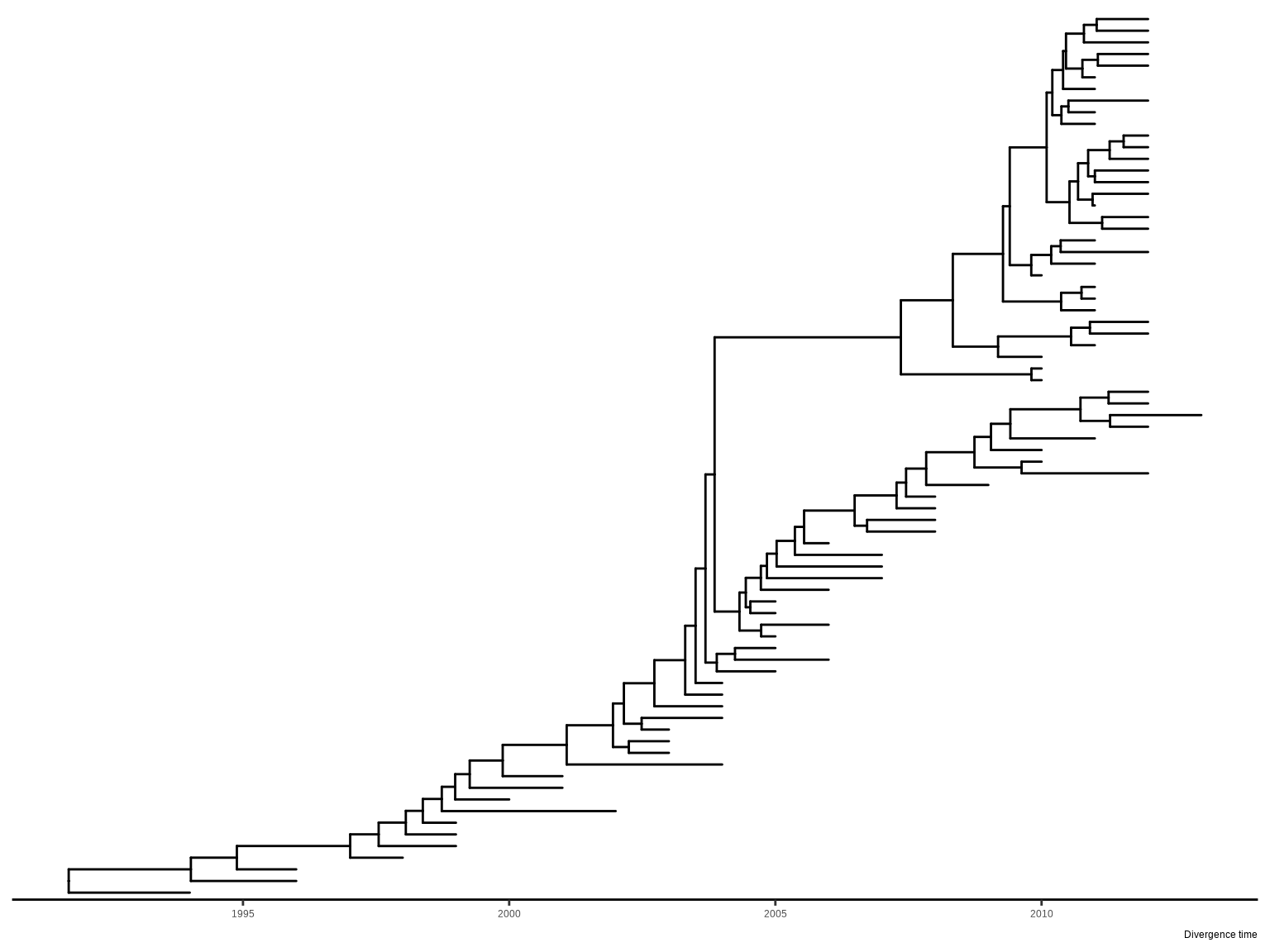
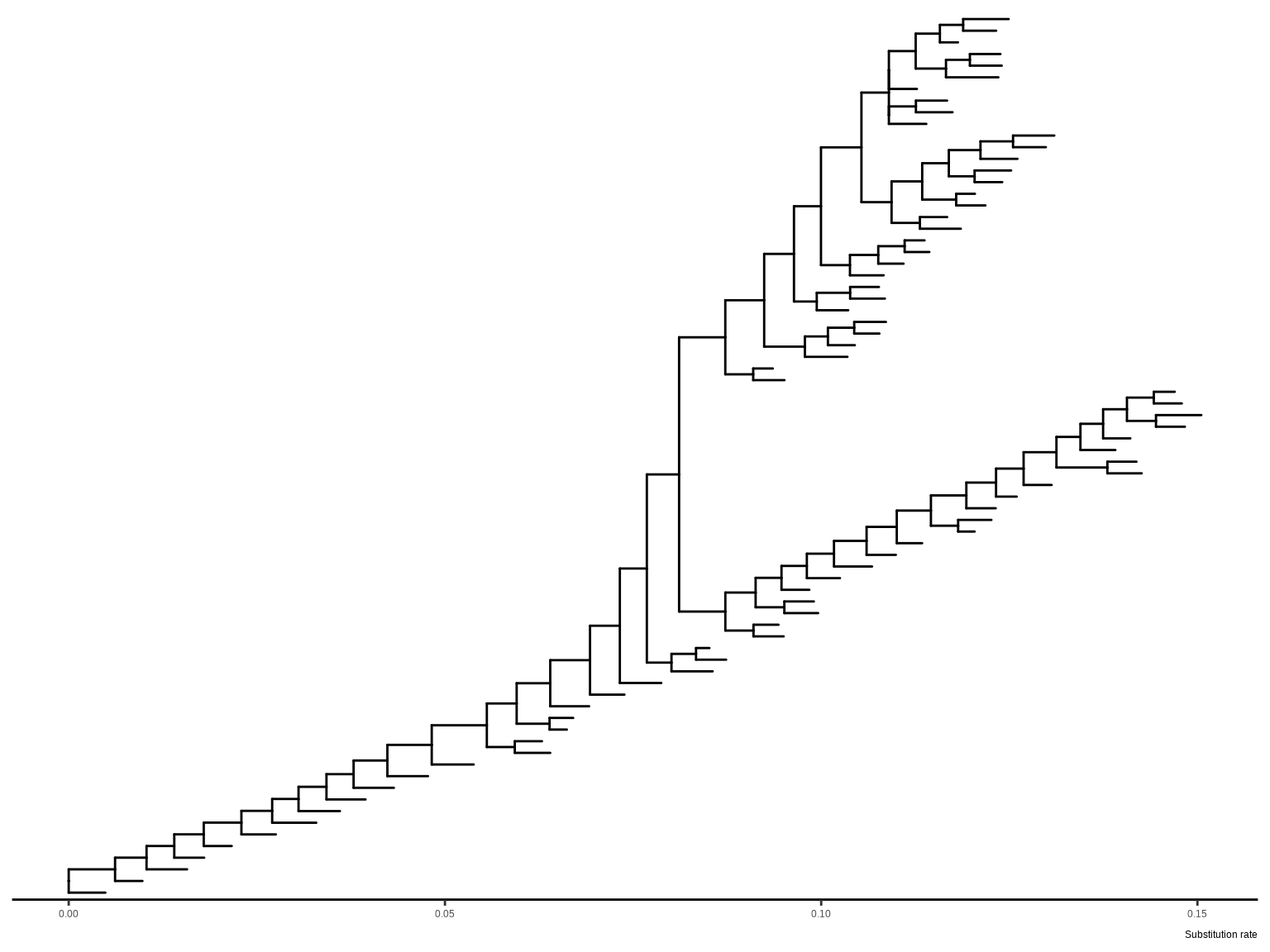
This provides a very convenient way to allow us to explore the relationship between tree associated data and tree structure through visualization. In addition to specifying branch.length in tree visualization, users can change branch length stored in tree object by using rescale_tree() function provided by the treeio package (Wang et al., 2020), and the following command will display a tree that is identical to Figure Figure 6.4 (b). The rescale_tree() function was documented in session 3.4.
beast_tree2 <- rescale_tree(beast_tree, branch.length='rate')
ggtree(beast_tree2) + theme_tree2()The theme_tree() defined a totally blank canvas, while theme_tree2() adds phylogenetic distance (via x-axis). These two themes all accept a parameter of bgcolor that defined the background color. Users can use any theme components to the theme_tree() or theme_tree2() functions to modify them (Figure Figure 6.5).
set.seed(2019)
x <- rtree(30)
ggtree(x, color="#0808E5", size=1) + theme_tree("#FEE4E9")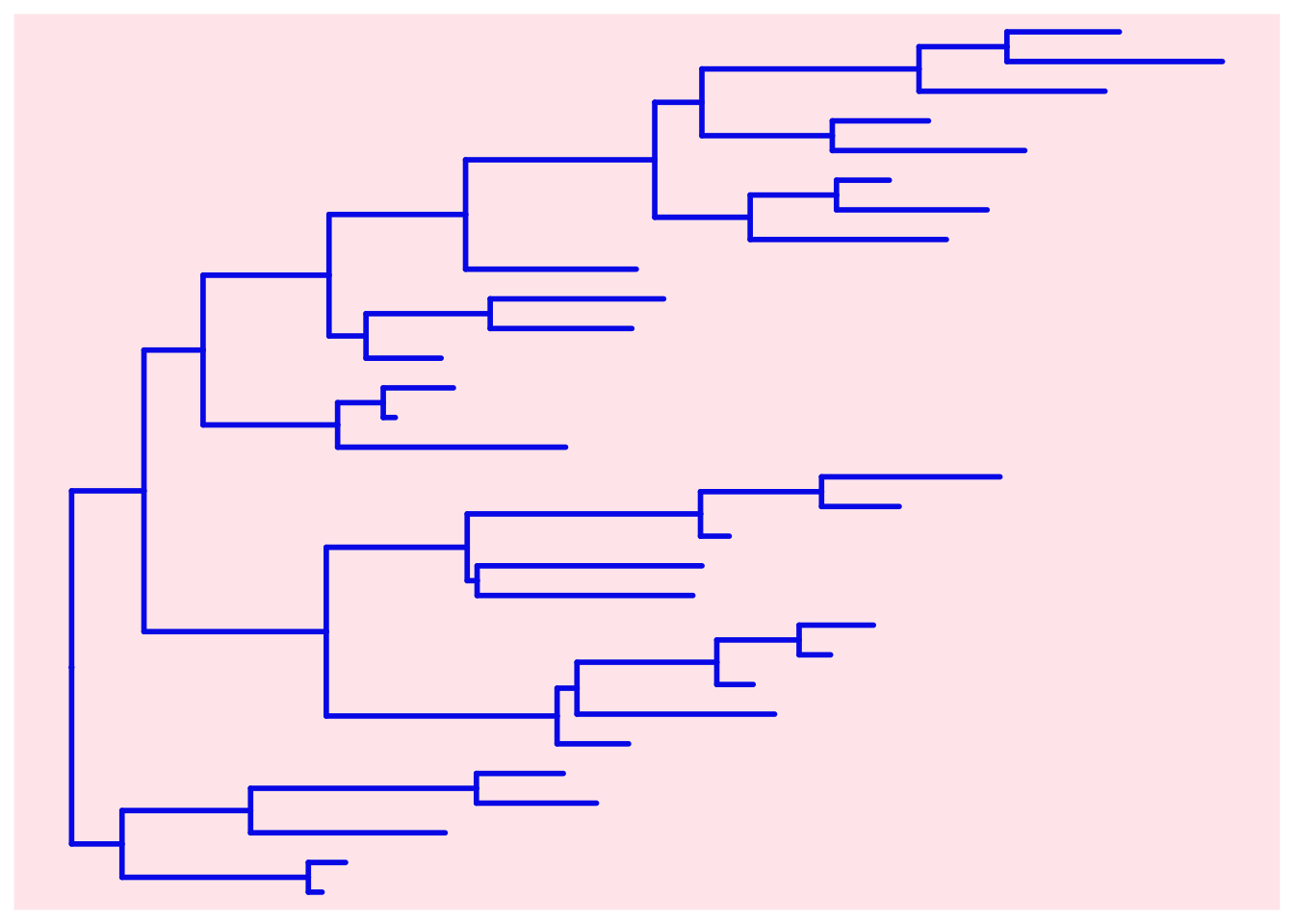
ggtree(x, color="orange", size=1) + theme_tree('grey30')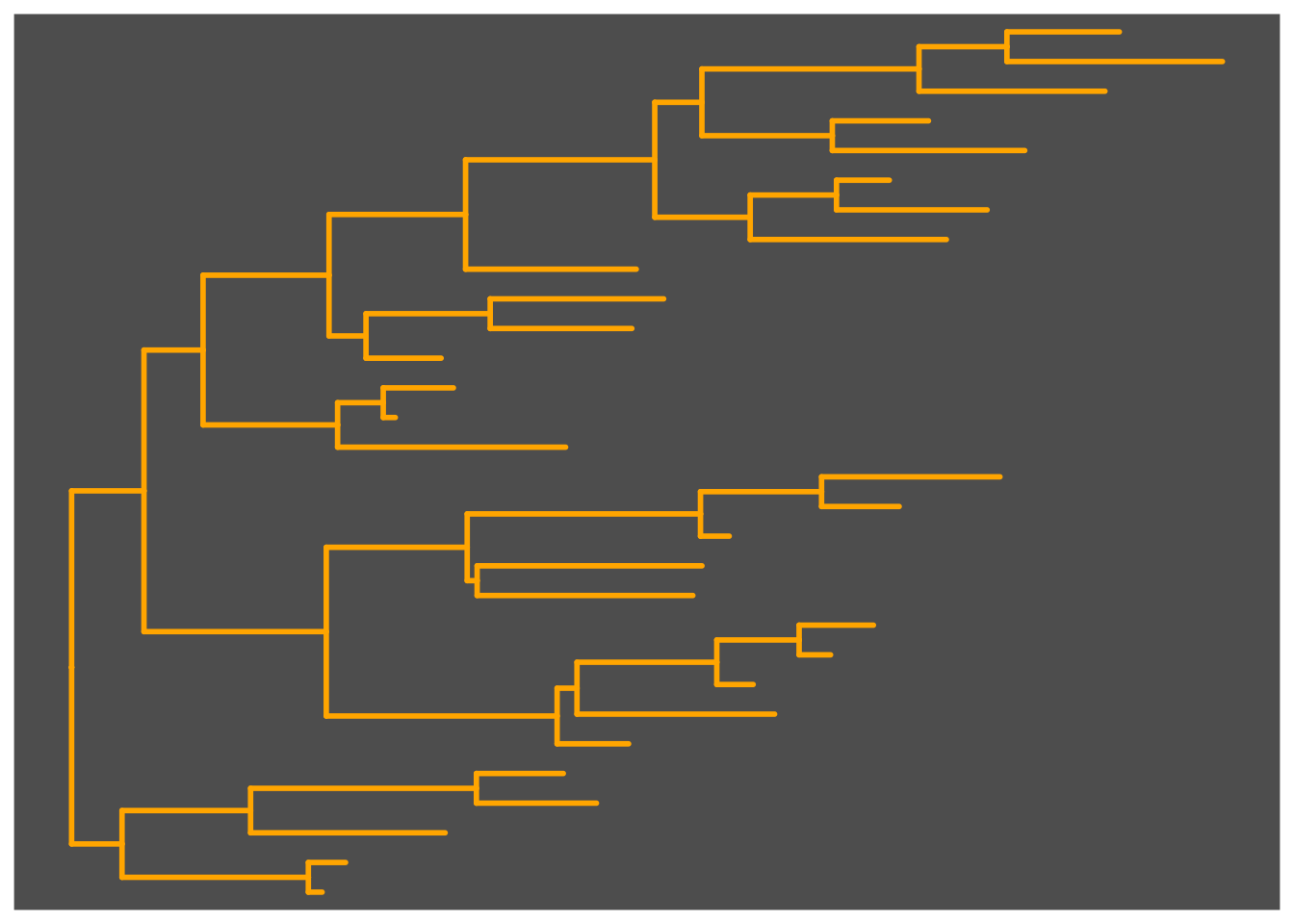
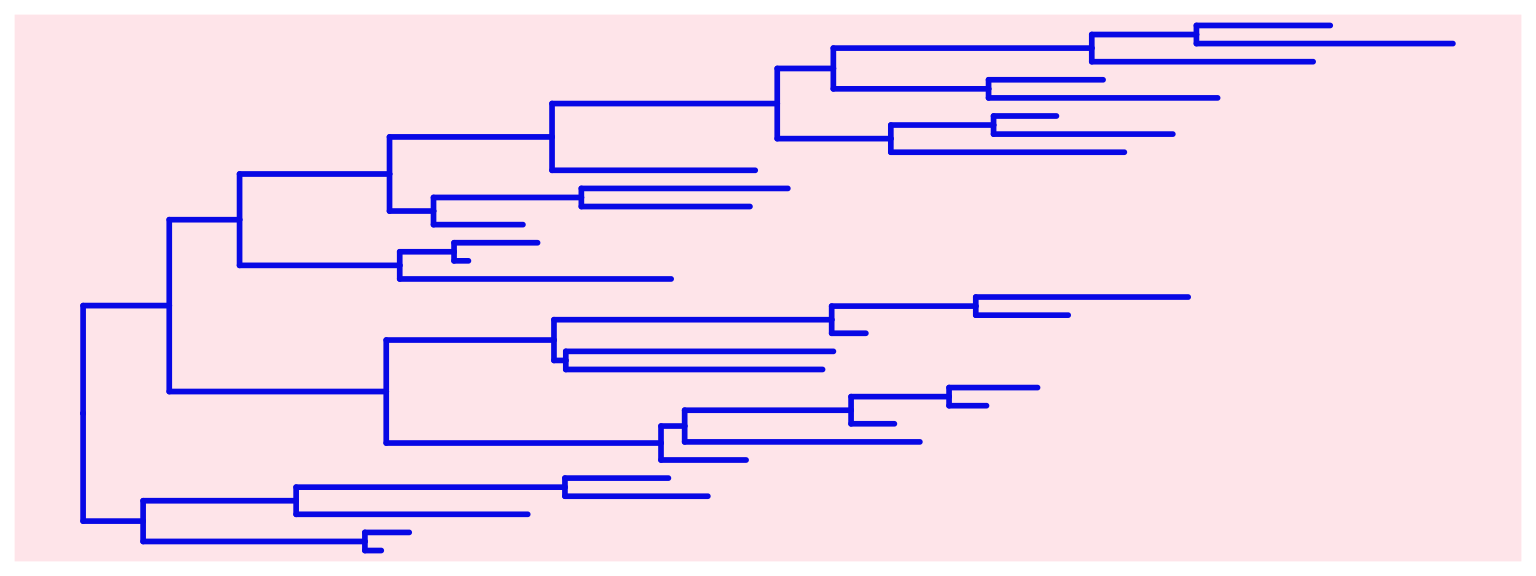
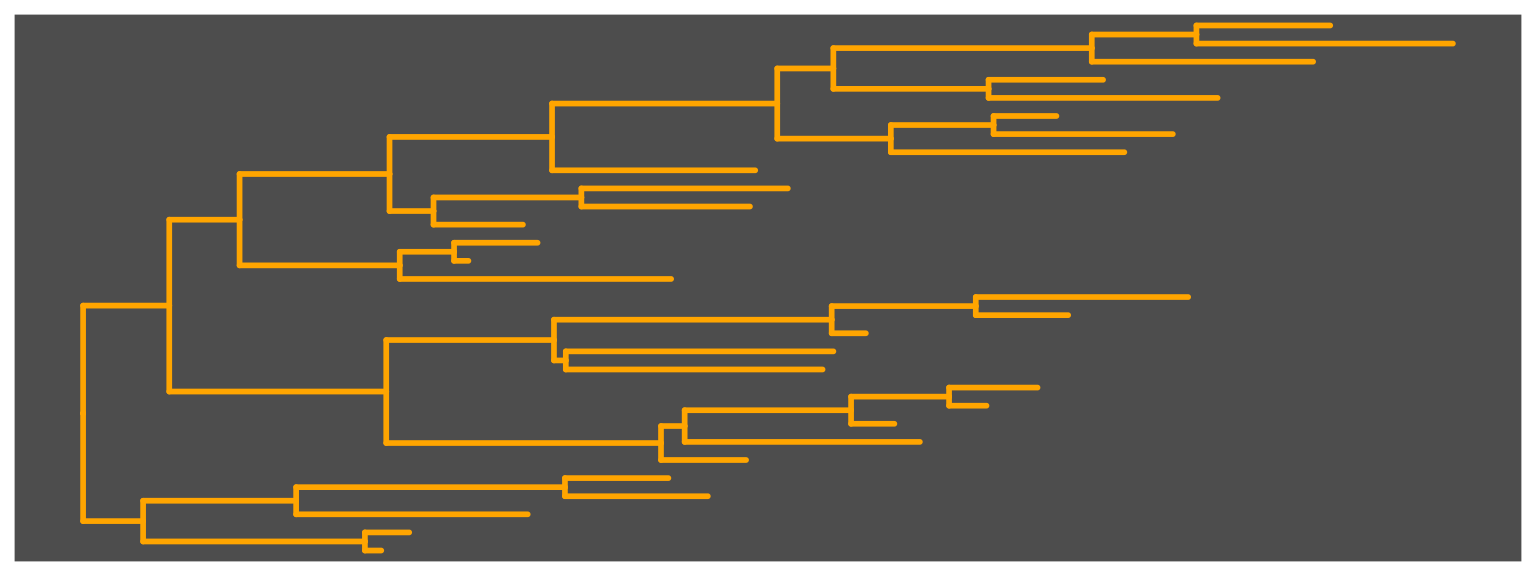
ggtree() output.
Users can also use an image file as the tree background, see example in Chapter 17.
In Section 3.6, we showed how to manipulate fortified tree data and manually place two trees face-to-face for comparison. That approach remains useful when full control over coordinates, offsets, and layer composition is required. In many routine applications, however, the analytical goal is more specific: two related trees need to be displayed side by side, matched taxa need to be connected, and the annotations on both trees need to remain legible. For this common task, ggtree now provides native paired-tree support through ggdoubletree(), fortify.tanglegram(), fortify.cophylo(), and geom_tanglelink().
The main user-facing entry point is ggdoubletree(). It accepts two raw trees, two pre-annotated ggtree objects, or a cophylo object together with an association table. This is particularly convenient when the two trees have already been decorated with labels, points, or other layers, because these annotations can be carried over into the paired display. When optimize = TRUE, ggtree performs a deterministic tip-order optimization step to reduce link crossings. The optimize_side argument specifies whether the optimization is applied to the "right" tree, the "left" tree, or "both". Figure Figure 6.6 presents a minimal example constructed from two annotated ggtree objects.
library(ggtree)

tr_left <- ape::read.tree(text = "(((a,b),c),(d,e));")
tr_right <- ape::read.tree(text = "((e,d),(c,(b,a)));")
assoc <- data.frame(
  left = c("a", "b", "c", "d", "e"),
  right = c("a", "b", "c", "d", "e")
)

left_view <- ggtree(tr_left) +
  geom_tiplab() +
  geom_tippoint(color = "#3C78D8", size = 2)

right_view <- ggtree(tr_right) +
  geom_tiplab() +
  geom_tippoint(color = "#D95F02", size = 2)

ggdoubletree(
  left_view,
  right_view,
  assoc,
  optimize = TRUE,
  optimize_side = "both"
) +
  geom_tanglelink(alpha = 0.35, color = "grey50")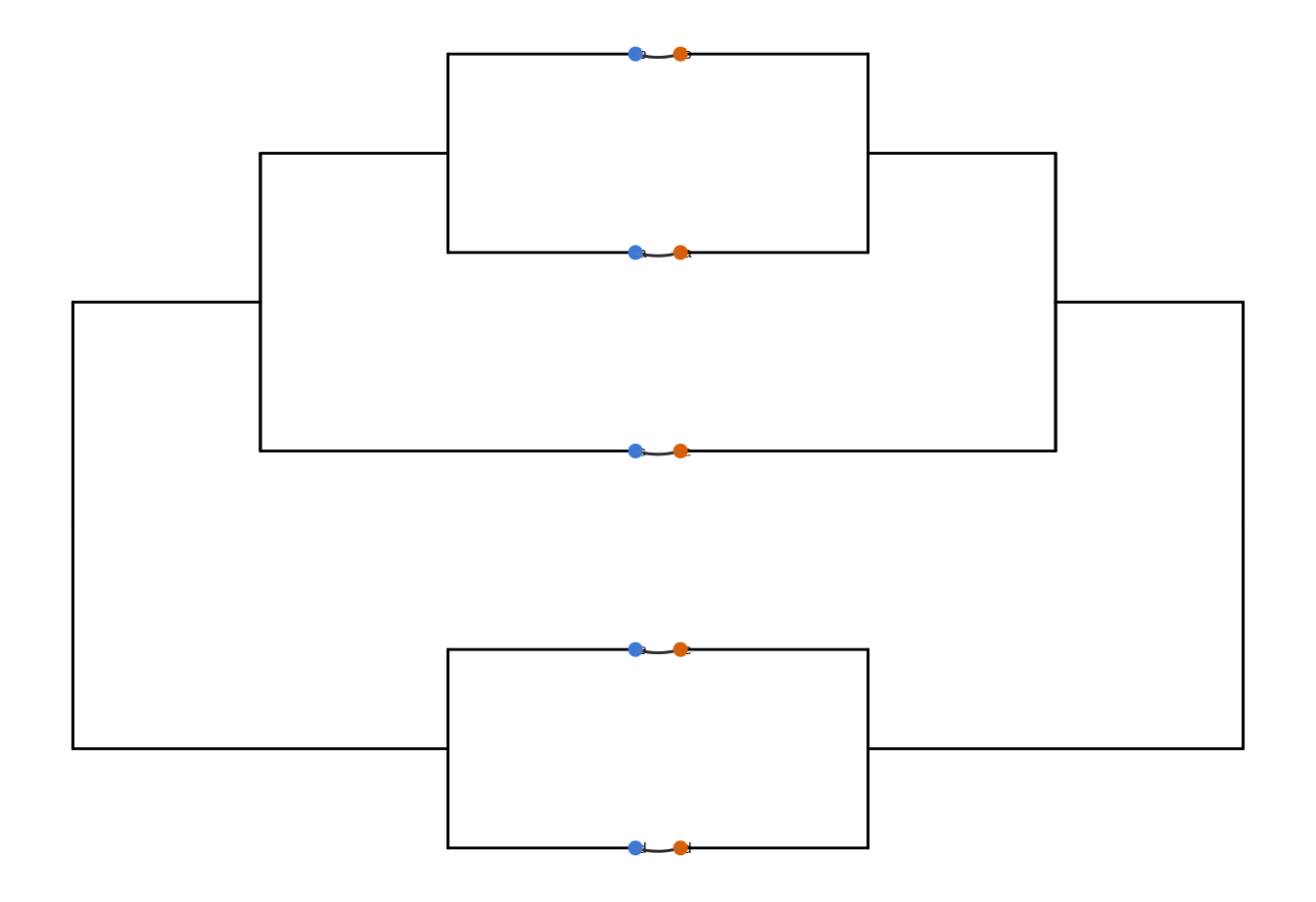
ggdoubletree() compares two annotated ggtree objects, preserves their tip annotations, and adds association links as a standard plotting layer.
Compared with the manual strategy in Section Section 3.6, the native paired-tree workflow removes much of the bookkeeping needed to mirror coordinates and resolve link positions by hand. At the same time, the lower-level fortify.tanglegram() and fortify.cophylo() methods remain useful when users wish to inspect or further manipulate the paired-tree data before drawing it.
The ggtree supports multiPhylo and treedataList objects and a list of trees can be viewed simultaneously. The trees will visualize one on top of another and can be plotted in different panels through facet_wrap() or facet_grid() functions (Figure Figure 6.7).
## trees <- lapply(c(10, 20, 40), rtree)
## class(trees) <- "multiPhylo"
## ggtree(trees) + facet_wrap(~.id, scale="free") + geom_tiplab()

f <- system.file("extdata/r8s", "H3_r8s_output.log", package="treeio")
r8s <- read.r8s(f)
ggtree(r8s) + facet_wrap( ~.id, scale="free") + theme_tree2()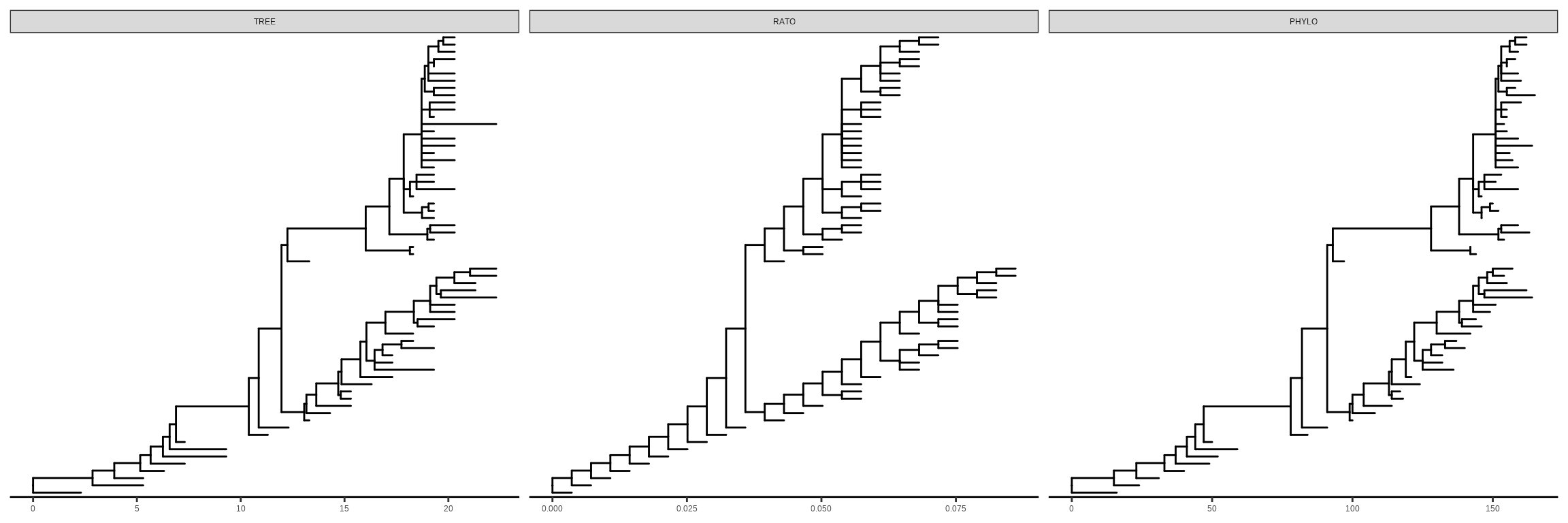
ggtree() function supports visualizing multiple trees stored in the multiPhylo or treedataList objects.
One hundred bootstrap trees can also be viewed simultaneously (Figure Figure 6.8). This allows researchers to explore a large set of phylogenetic trees to find consensus and distinct trees. The consensus tree can be summarized via a density tree (Figure Figure 6.10).
btrees <- read.tree(system.file("extdata/RAxML",
                                "RAxML_bootstrap.H3",
                                package="treeio")
                    )
ggtree(btrees) + facet_wrap(~.id, ncol=10)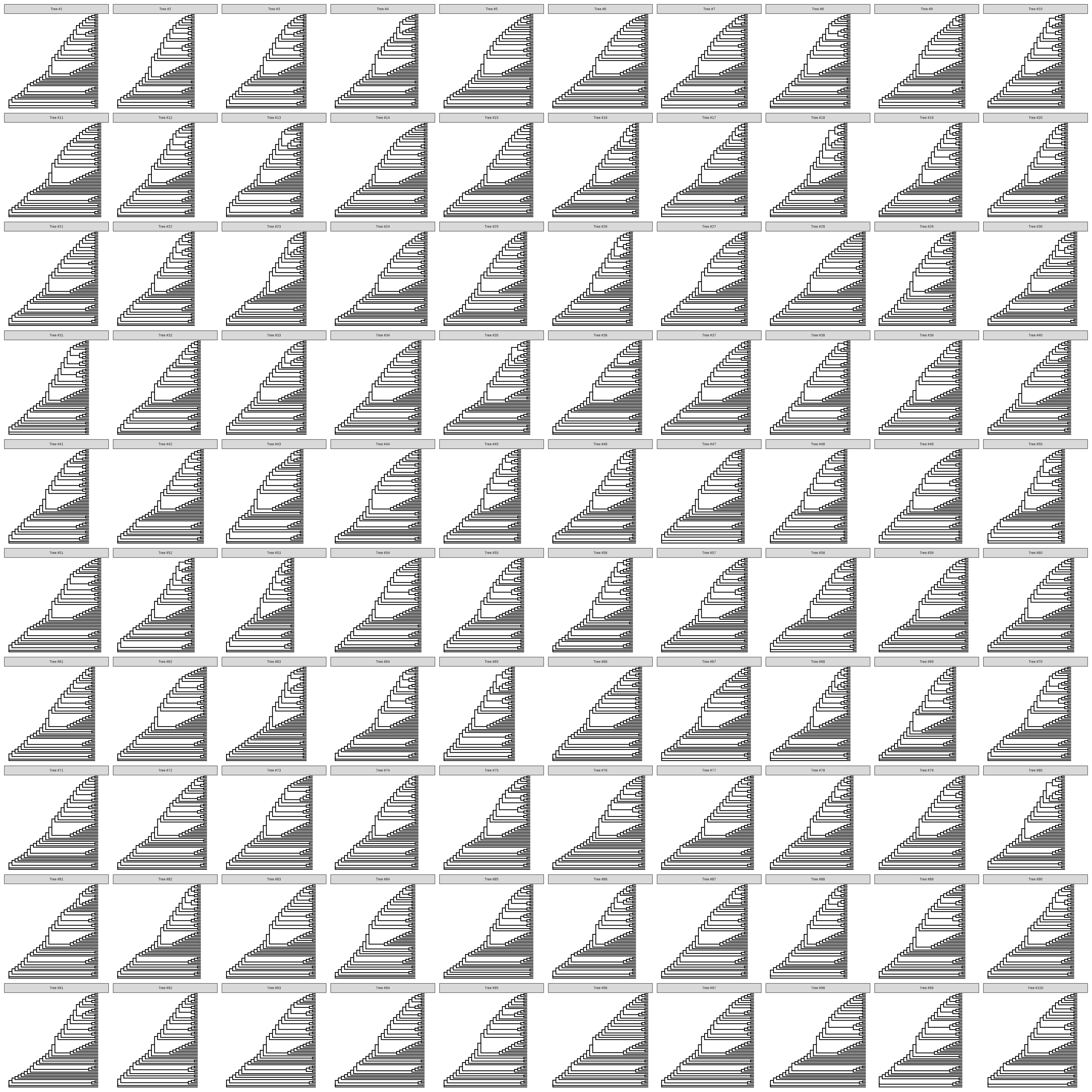
To annotate one tree (the same tree) with the values from different variables, one can plot them separately and use patchwork or aplot to combine them side-by-side.
Another solution is to utilize the ability to plot a list of trees by ggtree, and then add annotation layers for the selected variable at a specific panel via the subset aesthetic mapping supported by ggtree or using the td_filter() as demonstrated in Figure Figure 6.9. The .id is the conserved variable that is internally used to store the IDs of different trees.
set.seed(2020)
x <- rtree(30)
d <- data.frame(label=x$tip.label, var1=abs(rnorm(30)), var2=abs(rnorm(30)))
tree <- full_join(x, d, by='label')
trs <- list(TREE1 = tree, TREE2 = tree)
class(trs) <- 'treedataList'
ggtree(trs) + facet_wrap(~.id) +
  geom_tippoint(aes(colour=var1), data=td_filter(.id == "TREE1")) +
  scale_colour_gradient(low='blue', high='red') +
  ggnewscale::new_scale_colour()  +
  geom_tippoint(aes(colour=var2), data=td_filter(.id == "TREE2")) +
  scale_colour_viridis_c()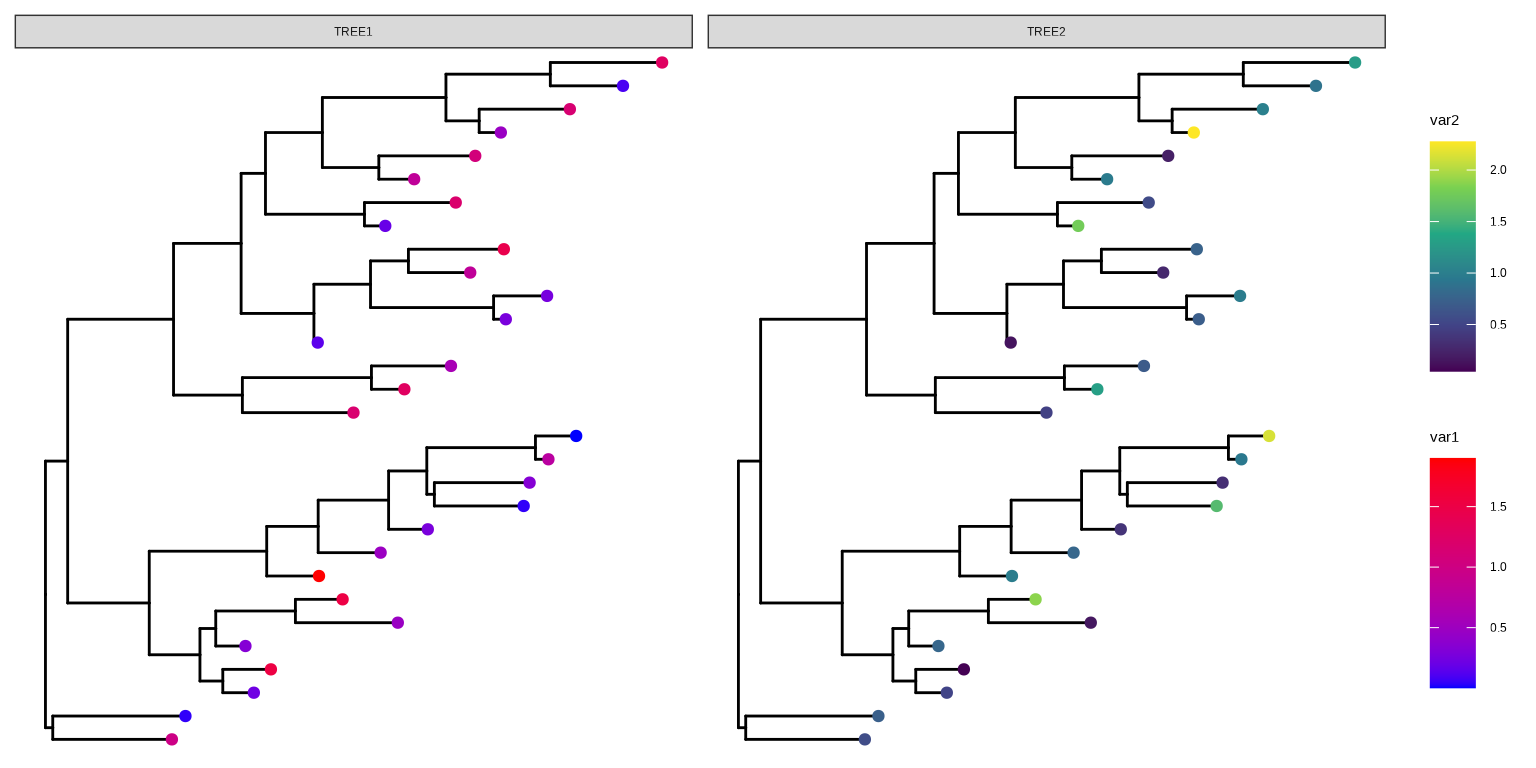
subset aesthetic mapping (as in TREE1 panel) or td_filter() (as in TREE2 panel) to filter variables to be displayed on the specific panel.
Another way to view the bootstrap trees is to merge them to form a density tree using ggdensitree() function (Figure Figure 6.10). This will help us identify consensus and differences among a large set of trees. The trees will be stacked on top of each other and the structures of the trees will be rotated to ensure the consistency of the tip order. The tip order is determined by the tip.order parameter and by default (tip.order = 'mode') the tips are ordered by the most commonly seen topology. The user can pass in a character vector to specify the tip order, or pass in an integer, N, to order the tips by the order of the tips in the Nth tree. Passing mds to tip.order will order the tips based on MDS (Multidimensional Scaling) of the path length between the tips, or passing mds_dist will order the tips based on MDS of the distance between the tips.
ggdensitree(btrees, alpha=.3, colour='steelblue') +
    geom_tiplab(size=3) + hexpand(.35)
Warning in FUN(X[[i]], ...): Arguments in `...` must be used.
✖ Problematic arguments:
• alpha = 0.3
• colour = "steelblue"
ℹ Did you misspell an argument name?
Arguments in `...` must be used.
✖ Problematic arguments:
• alpha = 0.3
• colour = "steelblue"
ℹ Did you misspell an argument name?
Arguments in `...` must be used.
✖ Problematic arguments:
• alpha = 0.3
• colour = "steelblue"
ℹ Did you misspell an argument name?
Arguments in `...` must be used.
✖ Problematic arguments:
• alpha = 0.3
• colour = "steelblue"
ℹ Did you misspell an argument name?
Arguments in `...` must be used.
✖ Problematic arguments:
• alpha = 0.3
• colour = "steelblue"
ℹ Did you misspell an argument name?
Arguments in `...` must be used.
✖ Problematic arguments:
• alpha = 0.3
• colour = "steelblue"
ℹ Did you misspell an argument name?
Arguments in `...` must be used.
✖ Problematic arguments:
• alpha = 0.3
• colour = "steelblue"
ℹ Did you misspell an argument name?
Arguments in `...` must be used.
✖ Problematic arguments:
• alpha = 0.3
• colour = "steelblue"
ℹ Did you misspell an argument name?
Arguments in `...` must be used.
✖ Problematic arguments:
• alpha = 0.3
• colour = "steelblue"
ℹ Did you misspell an argument name?
Arguments in `...` must be used.
✖ Problematic arguments:
• alpha = 0.3
• colour = "steelblue"
ℹ Did you misspell an argument name?
Arguments in `...` must be used.
✖ Problematic arguments:
• alpha = 0.3
• colour = "steelblue"
ℹ Did you misspell an argument name?
Arguments in `...` must be used.
✖ Problematic arguments:
• alpha = 0.3
• colour = "steelblue"
ℹ Did you misspell an argument name?
Arguments in `...` must be used.
✖ Problematic arguments:
• alpha = 0.3
• colour = "steelblue"
ℹ Did you misspell an argument name?
Arguments in `...` must be used.
✖ Problematic arguments:
• alpha = 0.3
• colour = "steelblue"
ℹ Did you misspell an argument name?
Arguments in `...` must be used.
✖ Problematic arguments:
• alpha = 0.3
• colour = "steelblue"
ℹ Did you misspell an argument name?
Arguments in `...` must be used.
✖ Problematic arguments:
• alpha = 0.3
• colour = "steelblue"
ℹ Did you misspell an argument name?
Arguments in `...` must be used.
✖ Problematic arguments:
• alpha = 0.3
• colour = "steelblue"
ℹ Did you misspell an argument name?
Arguments in `...` must be used.
✖ Problematic arguments:
• alpha = 0.3
• colour = "steelblue"
ℹ Did you misspell an argument name?
Arguments in `...` must be used.
✖ Problematic arguments:
• alpha = 0.3
• colour = "steelblue"
ℹ Did you misspell an argument name?
Arguments in `...` must be used.
✖ Problematic arguments:
• alpha = 0.3
• colour = "steelblue"
ℹ Did you misspell an argument name?
Arguments in `...` must be used.
✖ Problematic arguments:
• alpha = 0.3
• colour = "steelblue"
ℹ Did you misspell an argument name?
Arguments in `...` must be used.
✖ Problematic arguments:
• alpha = 0.3
• colour = "steelblue"
ℹ Did you misspell an argument name?
Arguments in `...` must be used.
✖ Problematic arguments:
• alpha = 0.3
• colour = "steelblue"
ℹ Did you misspell an argument name?
Arguments in `...` must be used.
✖ Problematic arguments:
• alpha = 0.3
• colour = "steelblue"
ℹ Did you misspell an argument name?
Arguments in `...` must be used.
✖ Problematic arguments:
• alpha = 0.3
• colour = "steelblue"
ℹ Did you misspell an argument name?
Arguments in `...` must be used.
✖ Problematic arguments:
• alpha = 0.3
• colour = "steelblue"
ℹ Did you misspell an argument name?
Arguments in `...` must be used.
✖ Problematic arguments:
• alpha = 0.3
• colour = "steelblue"
ℹ Did you misspell an argument name?
Arguments in `...` must be used.
✖ Problematic arguments:
• alpha = 0.3
• colour = "steelblue"
ℹ Did you misspell an argument name?
Arguments in `...` must be used.
✖ Problematic arguments:
• alpha = 0.3
• colour = "steelblue"
ℹ Did you misspell an argument name?
Arguments in `...` must be used.
✖ Problematic arguments:
• alpha = 0.3
• colour = "steelblue"
ℹ Did you misspell an argument name?
Arguments in `...` must be used.
✖ Problematic arguments:
• alpha = 0.3
• colour = "steelblue"
ℹ Did you misspell an argument name?
Arguments in `...` must be used.
✖ Problematic arguments:
• alpha = 0.3
• colour = "steelblue"
ℹ Did you misspell an argument name?
Arguments in `...` must be used.
✖ Problematic arguments:
• alpha = 0.3
• colour = "steelblue"
ℹ Did you misspell an argument name?
Arguments in `...` must be used.
✖ Problematic arguments:
• alpha = 0.3
• colour = "steelblue"
ℹ Did you misspell an argument name?
Arguments in `...` must be used.
✖ Problematic arguments:
• alpha = 0.3
• colour = "steelblue"
ℹ Did you misspell an argument name?
Arguments in `...` must be used.
✖ Problematic arguments:
• alpha = 0.3
• colour = "steelblue"
ℹ Did you misspell an argument name?
Arguments in `...` must be used.
✖ Problematic arguments:
• alpha = 0.3
• colour = "steelblue"
ℹ Did you misspell an argument name?
Arguments in `...` must be used.
✖ Problematic arguments:
• alpha = 0.3
• colour = "steelblue"
ℹ Did you misspell an argument name?
Arguments in `...` must be used.
✖ Problematic arguments:
• alpha = 0.3
• colour = "steelblue"
ℹ Did you misspell an argument name?
Arguments in `...` must be used.
✖ Problematic arguments:
• alpha = 0.3
• colour = "steelblue"
ℹ Did you misspell an argument name?
Arguments in `...` must be used.
✖ Problematic arguments:
• alpha = 0.3
• colour = "steelblue"
ℹ Did you misspell an argument name?
Arguments in `...` must be used.
✖ Problematic arguments:
• alpha = 0.3
• colour = "steelblue"
ℹ Did you misspell an argument name?
Arguments in `...` must be used.
✖ Problematic arguments:
• alpha = 0.3
• colour = "steelblue"
ℹ Did you misspell an argument name?
Arguments in `...` must be used.
✖ Problematic arguments:
• alpha = 0.3
• colour = "steelblue"
ℹ Did you misspell an argument name?
Arguments in `...` must be used.
✖ Problematic arguments:
• alpha = 0.3
• colour = "steelblue"
ℹ Did you misspell an argument name?
Arguments in `...` must be used.
✖ Problematic arguments:
• alpha = 0.3
• colour = "steelblue"
ℹ Did you misspell an argument name?
Arguments in `...` must be used.
✖ Problematic arguments:
• alpha = 0.3
• colour = "steelblue"
ℹ Did you misspell an argument name?
Arguments in `...` must be used.
✖ Problematic arguments:
• alpha = 0.3
• colour = "steelblue"
ℹ Did you misspell an argument name?
Arguments in `...` must be used.
✖ Problematic arguments:
• alpha = 0.3
• colour = "steelblue"
ℹ Did you misspell an argument name?
Arguments in `...` must be used.
✖ Problematic arguments:
• alpha = 0.3
• colour = "steelblue"
ℹ Did you misspell an argument name?
Arguments in `...` must be used.
✖ Problematic arguments:
• alpha = 0.3
• colour = "steelblue"
ℹ Did you misspell an argument name?
Arguments in `...` must be used.
✖ Problematic arguments:
• alpha = 0.3
• colour = "steelblue"
ℹ Did you misspell an argument name?
Arguments in `...` must be used.
✖ Problematic arguments:
• alpha = 0.3
• colour = "steelblue"
ℹ Did you misspell an argument name?
Arguments in `...` must be used.
✖ Problematic arguments:
• alpha = 0.3
• colour = "steelblue"
ℹ Did you misspell an argument name?
Arguments in `...` must be used.
✖ Problematic arguments:
• alpha = 0.3
• colour = "steelblue"
ℹ Did you misspell an argument name?
Arguments in `...` must be used.
✖ Problematic arguments:
• alpha = 0.3
• colour = "steelblue"
ℹ Did you misspell an argument name?
Arguments in `...` must be used.
✖ Problematic arguments:
• alpha = 0.3
• colour = "steelblue"
ℹ Did you misspell an argument name?
Arguments in `...` must be used.
✖ Problematic arguments:
• alpha = 0.3
• colour = "steelblue"
ℹ Did you misspell an argument name?
Arguments in `...` must be used.
✖ Problematic arguments:
• alpha = 0.3
• colour = "steelblue"
ℹ Did you misspell an argument name?
Arguments in `...` must be used.
✖ Problematic arguments:
• alpha = 0.3
• colour = "steelblue"
ℹ Did you misspell an argument name?
Arguments in `...` must be used.
✖ Problematic arguments:
• alpha = 0.3
• colour = "steelblue"
ℹ Did you misspell an argument name?
Arguments in `...` must be used.
✖ Problematic arguments:
• alpha = 0.3
• colour = "steelblue"
ℹ Did you misspell an argument name?
Arguments in `...` must be used.
✖ Problematic arguments:
• alpha = 0.3
• colour = "steelblue"
ℹ Did you misspell an argument name?
Arguments in `...` must be used.
✖ Problematic arguments:
• alpha = 0.3
• colour = "steelblue"
ℹ Did you misspell an argument name?
Arguments in `...` must be used.
✖ Problematic arguments:
• alpha = 0.3
• colour = "steelblue"
ℹ Did you misspell an argument name?
Arguments in `...` must be used.
✖ Problematic arguments:
• alpha = 0.3
• colour = "steelblue"
ℹ Did you misspell an argument name?
Arguments in `...` must be used.
✖ Problematic arguments:
• alpha = 0.3
• colour = "steelblue"
ℹ Did you misspell an argument name?
Arguments in `...` must be used.
✖ Problematic arguments:
• alpha = 0.3
• colour = "steelblue"
ℹ Did you misspell an argument name?
Arguments in `...` must be used.
✖ Problematic arguments:
• alpha = 0.3
• colour = "steelblue"
ℹ Did you misspell an argument name?
Arguments in `...` must be used.
✖ Problematic arguments:
• alpha = 0.3
• colour = "steelblue"
ℹ Did you misspell an argument name?
Arguments in `...` must be used.
✖ Problematic arguments:
• alpha = 0.3
• colour = "steelblue"
ℹ Did you misspell an argument name?
Arguments in `...` must be used.
✖ Problematic arguments:
• alpha = 0.3
• colour = "steelblue"
ℹ Did you misspell an argument name?
Arguments in `...` must be used.
✖ Problematic arguments:
• alpha = 0.3
• colour = "steelblue"
ℹ Did you misspell an argument name?
Arguments in `...` must be used.
✖ Problematic arguments:
• alpha = 0.3
• colour = "steelblue"
ℹ Did you misspell an argument name?
Arguments in `...` must be used.
✖ Problematic arguments:
• alpha = 0.3
• colour = "steelblue"
ℹ Did you misspell an argument name?
Arguments in `...` must be used.
✖ Problematic arguments:
• alpha = 0.3
• colour = "steelblue"
ℹ Did you misspell an argument name?
Arguments in `...` must be used.
✖ Problematic arguments:
• alpha = 0.3
• colour = "steelblue"
ℹ Did you misspell an argument name?
Arguments in `...` must be used.
✖ Problematic arguments:
• alpha = 0.3
• colour = "steelblue"
ℹ Did you misspell an argument name?
Arguments in `...` must be used.
✖ Problematic arguments:
• alpha = 0.3
• colour = "steelblue"
ℹ Did you misspell an argument name?
Arguments in `...` must be used.
✖ Problematic arguments:
• alpha = 0.3
• colour = "steelblue"
ℹ Did you misspell an argument name?
Arguments in `...` must be used.
✖ Problematic arguments:
• alpha = 0.3
• colour = "steelblue"
ℹ Did you misspell an argument name?
Arguments in `...` must be used.
✖ Problematic arguments:
• alpha = 0.3
• colour = "steelblue"
ℹ Did you misspell an argument name?
Arguments in `...` must be used.
✖ Problematic arguments:
• alpha = 0.3
• colour = "steelblue"
ℹ Did you misspell an argument name?
Arguments in `...` must be used.
✖ Problematic arguments:
• alpha = 0.3
• colour = "steelblue"
ℹ Did you misspell an argument name?
Arguments in `...` must be used.
✖ Problematic arguments:
• alpha = 0.3
• colour = "steelblue"
ℹ Did you misspell an argument name?
Arguments in `...` must be used.
✖ Problematic arguments:
• alpha = 0.3
• colour = "steelblue"
ℹ Did you misspell an argument name?
Arguments in `...` must be used.
✖ Problematic arguments:
• alpha = 0.3
• colour = "steelblue"
ℹ Did you misspell an argument name?
Arguments in `...` must be used.
✖ Problematic arguments:
• alpha = 0.3
• colour = "steelblue"
ℹ Did you misspell an argument name?
Arguments in `...` must be used.
✖ Problematic arguments:
• alpha = 0.3
• colour = "steelblue"
ℹ Did you misspell an argument name?
Arguments in `...` must be used.
✖ Problematic arguments:
• alpha = 0.3
• colour = "steelblue"
ℹ Did you misspell an argument name?
Arguments in `...` must be used.
✖ Problematic arguments:
• alpha = 0.3
• colour = "steelblue"
ℹ Did you misspell an argument name?
Arguments in `...` must be used.
✖ Problematic arguments:
• alpha = 0.3
• colour = "steelblue"
ℹ Did you misspell an argument name?
Arguments in `...` must be used.
✖ Problematic arguments:
• alpha = 0.3
• colour = "steelblue"
ℹ Did you misspell an argument name?
Arguments in `...` must be used.
✖ Problematic arguments:
• alpha = 0.3
• colour = "steelblue"
ℹ Did you misspell an argument name?
Arguments in `...` must be used.
✖ Problematic arguments:
• alpha = 0.3
• colour = "steelblue"
ℹ Did you misspell an argument name?
Arguments in `...` must be used.
✖ Problematic arguments:
• alpha = 0.3
• colour = "steelblue"
ℹ Did you misspell an argument name?
Arguments in `...` must be used.
✖ Problematic arguments:
• alpha = 0.3
• colour = "steelblue"
ℹ Did you misspell an argument name?
Arguments in `...` must be used.
✖ Problematic arguments:
• alpha = 0.3
• colour = "steelblue"
ℹ Did you misspell an argument name?
Arguments in `...` must be used.
✖ Problematic arguments:
• alpha = 0.3
• colour = "steelblue"
ℹ Did you misspell an argument name?
Arguments in `...` must be used.
✖ Problematic arguments:
• alpha = 0.3
• colour = "steelblue"
ℹ Did you misspell an argument name?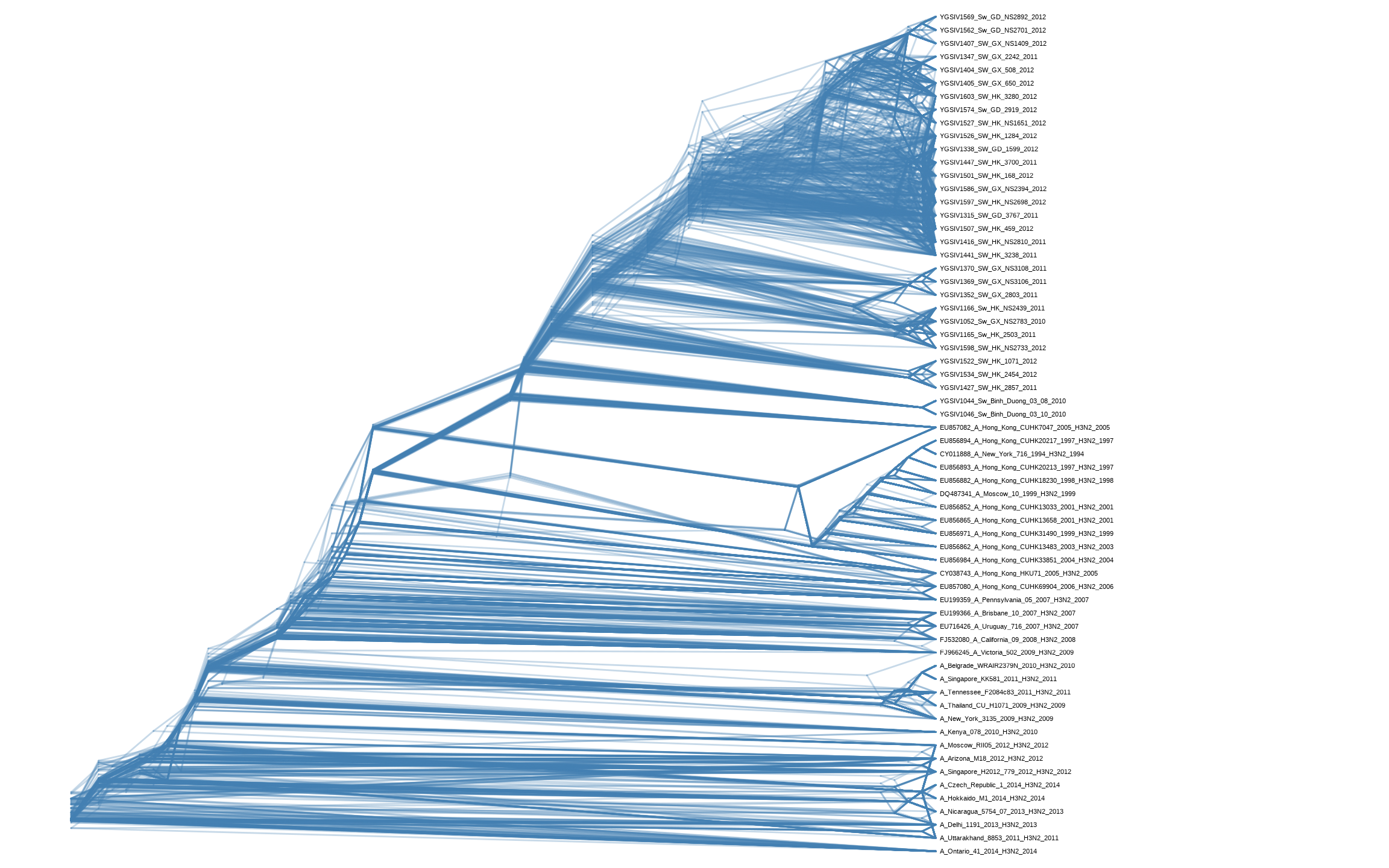
Visualizing phylogenetic trees with ggtree is easy by using a single command ggtree(tree). The ggtree package provides several geometric layers to display tree components such as tip labels, symbolic points for both external and internal nodes, root-edge, etc. Associated data can be used to rescale branch lengths, color the tree, and be displayed on the tree. All these can be done by the ggplot2 grammar of graphic syntax, which makes it very easy to overlay layers and customize the tree graph (via ggplot2 themes and scales). The ggtree package also provides several layers that are specifically designed for tree annotation which will be introduced in Chapter 8. The ggtree package makes the presentation of trees and associated data extremely easy. Simple graphs are easy to generate, while complex graphs are simply superimposed layers and are also easy to generate.