See what your Agent did.
Rho is a local workspace for R projects that you share with an Agent: Claude Code, Codex, or DeepSeek Harness through its plugin. The same files, the same runs, and one record of how each result was reached.
Loading the demo…
This is Rho itself, replaying six recorded requests to an Agent on the PA14 quorum-sensing project it ships with. Open a figure, a table, the Graph or a Studio session. There is no backend: nothing you do here is sent anywhere.
Full screenInstall it by asking
Your Agent can install Rho, start it and connect itself to the example in one conversation. You give it one sentence; the setup page that sentence names holds every command, so you can read it first.
Paste one sentence into your Agent.
Use Claude Code or Codex on the machine where your projects live. The setup page tells it when to stop and ask you: a different Node, or an install that needs administrator rights.
Read https://yulab-smu.top/
Rho/ and follow its steps to install and configure Rho for me.doc/ setup.md 请阅读 https://yulab-smu.top/
Rho/ 文档,按照步骤为我安装并配置 Rho。doc/ setup.md
The same request in English and in Chinese. The setup page asks your Agent to write to you in the language you use.
It follows the setup page.
The page tells your Agent to use your own permissions and never run sudo, to leave a Rho that is already here as it is, and to stop and show you any step that fails. Its eight steps are addressed to your Agent, and each says how to check it:
- Check the machine
- Look for a Rho that is already here
- Install
- Start Rho
- Install the Rho skill for yourself
- Connect yourself to the example project
- Check R for the Notebook
- Tell the person
$ npm install -g @rho-workspace/rho
added 1 package in 9s
$ mkdir -p "$HOME/Rho/projects" \
    "$HOME/Rho/state"
$ nohup rho \
    --root "$HOME/Rho/projects" \
    --state-dir "$HOME/Rho/state" \
    --open > "$HOME/Rho/rho.log" 2>&1 &
$ head -1 "$HOME/Rho/rho.log"
{"ready":{"url":"http://127.0.0.1:…
$ dir="$HOME/.claude/skills/rho"
$ head -3 "$dir/SKILL.md"
---
name: rho
description: Install, start, …
Steps 3 to 5 as they ran on npm 0.5.3 on macOS arm64, in a throwaway home folder. Some commands, checks and output are left out, and long lines are split or cut. The address is on your own computer: there is no Rho server or account. Read the whole page
Open the example and ask.
The first start copies the PA14 quorum-sensing project into ~/Rho/projects: the project in the demo above, with its recorded work. The setup page's last step has your Agent give you Rho's address and say what is missing, if anything. Ask in Rho's Agent panel, which drives your own Claude Code or Codex under your own permissions.
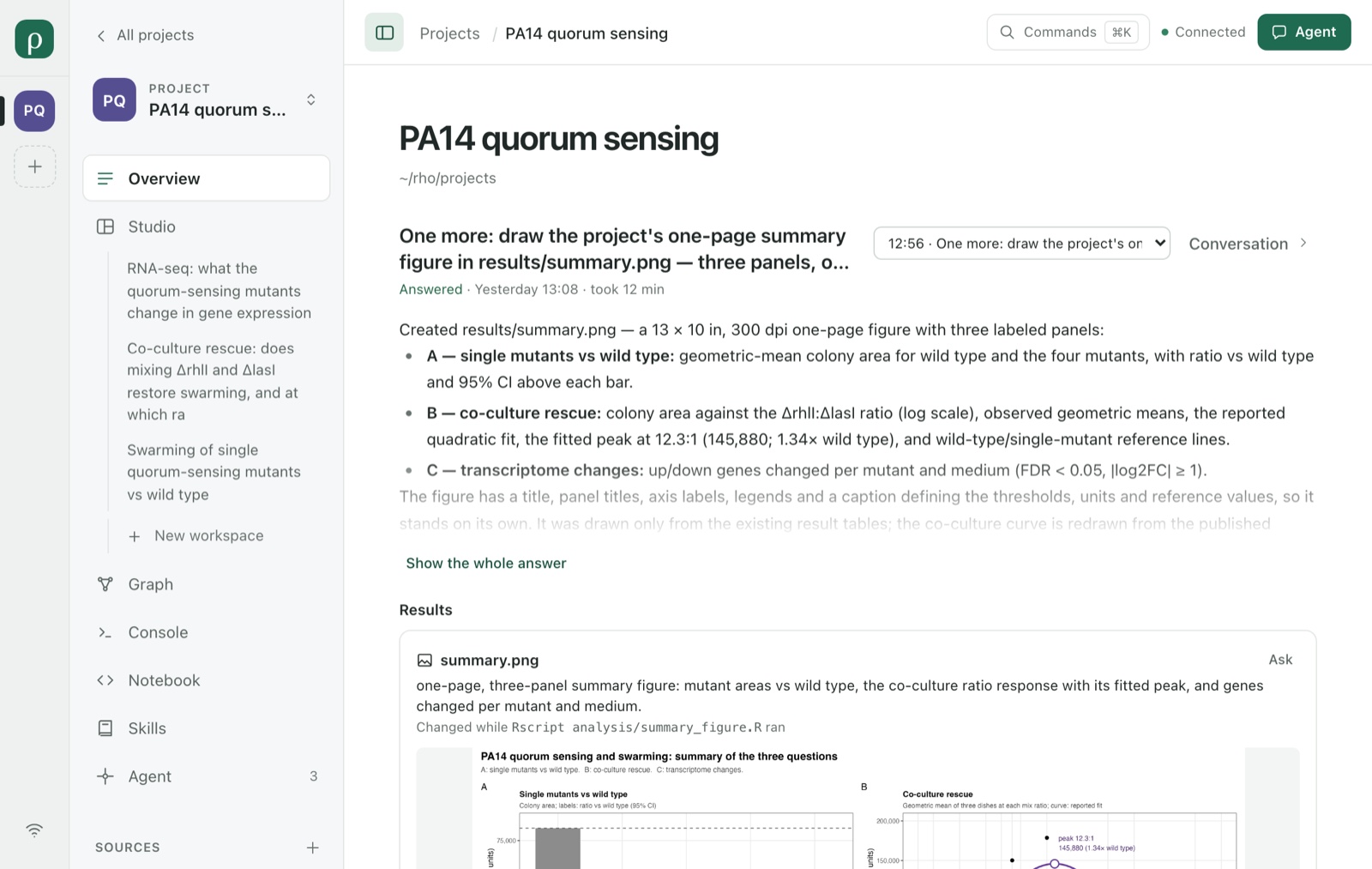
The Overview opens on the latest answer and the files it produced.
Or install it yourself
The same install by hand, with the service state outside the projects folder. In these two folders, an Agent you ask later finds this Rho instead of setting up another. Install guide
Using DeepSeek Harness? The dsh-rho plugin guide covers the prebuilt 0.1.4 Git package and Rho's own Harness index, matching your conversation's project and selected-result questions.
$ npm install -g @rho-workspace/rho
$ mkdir -p ~/Rho/projects ~/Rho/state
$ rho --root ~/Rho/projects \
--state-dir ~/Rho/state --open| Node | 22.22 or later, below 27: Node 22, 24 or 26. A different Node prints one EBADENGINE warning. |
|---|---|
| Agent | Rho's Agent panel drives your own Claude Code or Codex. DeepSeek Harness connects as an external Agent through the dsh-rho plugin. |
| R | Only for R work. Rho installs no R packages on its own; a missing Rscript is reported, not worked around. |
| Systems | macOS arm64 is the baseline. Linux x64 and arm64 and Windows x64 are checked in CI; macOS x64 runs only under Rosetta. |
| Uninstall | npm uninstall -g @rho-workspace/rho removes the package. Your projects, Rho's state and its log stay where they are, and so do the Rho skill and the MCP entry the setup page gave your Agent; the page says where they are. |
Prompts to start from
The first set is what a person typed in Rho's Agent panel to build the example project: the session the demo replays, answered by Claude Code. The others are the prompts each plugin offers for itself; their file names stand in for yours.
The PA14 quorum-sensing project. 6 requests, in the order they were sent, each followed by how long the Agent took and what it wrote.
- 17 minto answer
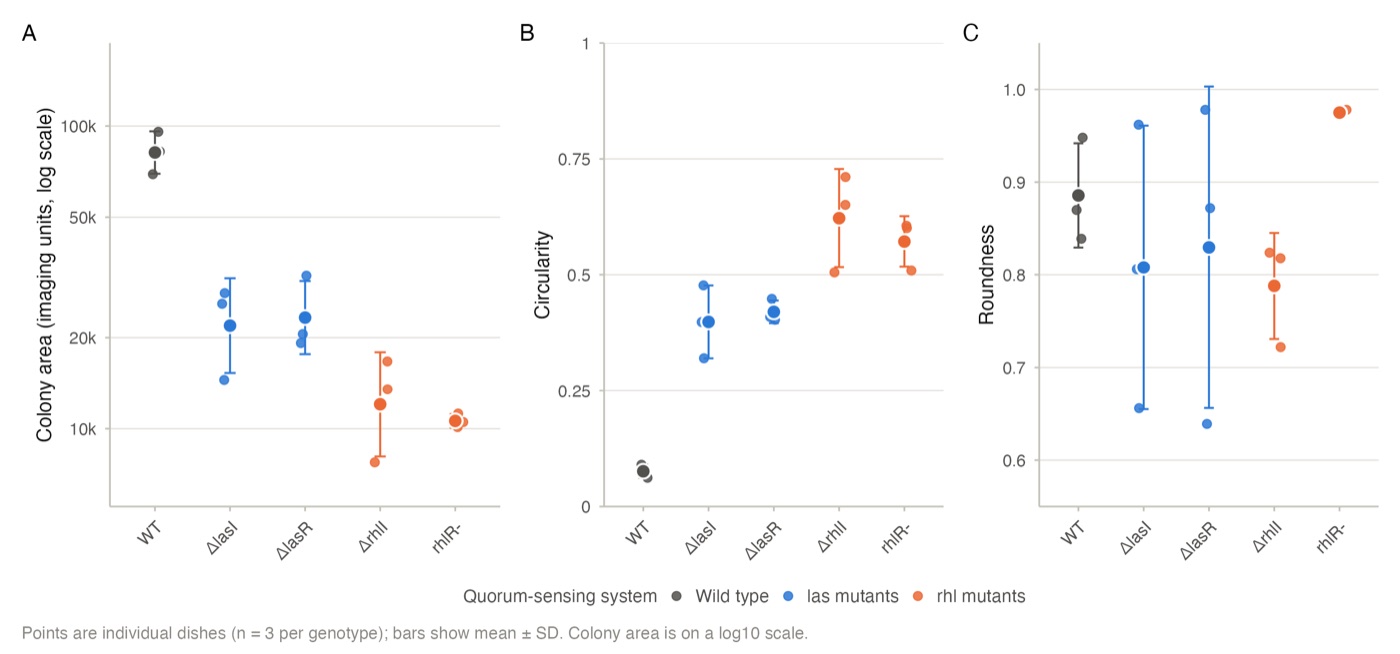
Let's start with the swarming assay of the single mutants. I want to know whether losing either quorum-sensing system makes PA14 swarm worse than wild type: compare the mutants against wild type on colony area, say how big the difference is, and whether the colonies also change shape. Do the analysis in R and leave a figure and a table of the numbers in results/ so I can look at them.
Wrote swarming_single_mutants.R, swarming_single_mutants_summary.csv, swarming_system_contrast.csv and 1 more.
- 15 minto answer
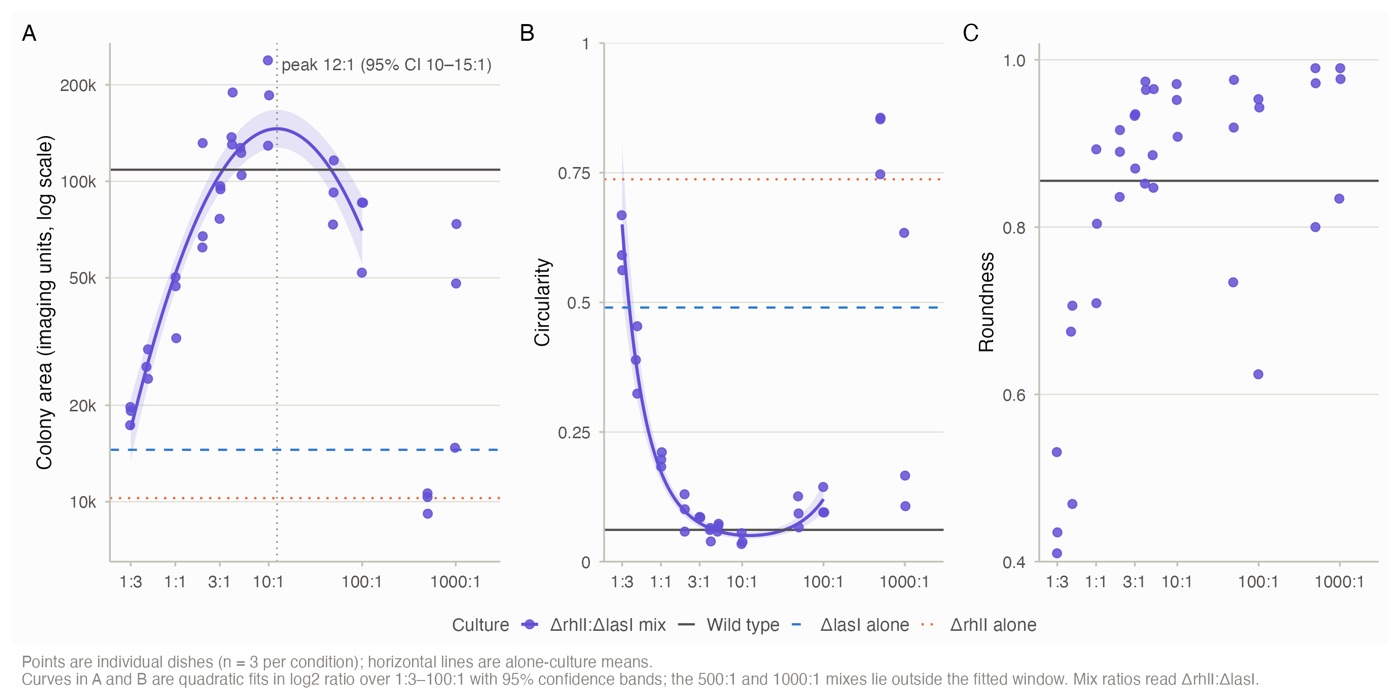
Now the co-culture experiment: when ΔrhlI and ΔlasI are grown together, do they swarm like wild type again, and does it depend on the ratio they are mixed at? I care about where the peak is and how strong the ratio effect is. Same rules: R, a figure and a table in results/. One clean figure is enough — do not spend several rounds restyling it.
Wrote swarming_cocultures.R, swarming_cocultures_summary.csv, swarming_cocultures_ratio_model.csv and 1 more.
- 22 minto answer
Next, the expression side: what do the mutants change in gene expression? The counts and sample sheet are in data/rnaseq; strains 97 and 98 are the single mutants and 99 is the double. Compare each mutant with wild type in each medium, and tell me what stands out — how many genes change, the strongest ones, and whether the two single mutants overlap. Leave the differential-expression table and a figure in results/.
Wrote rnaseq_differential_expression.R, rnaseq_differential_expression.csv, rnaseq_de_summary.csv and 4 more.
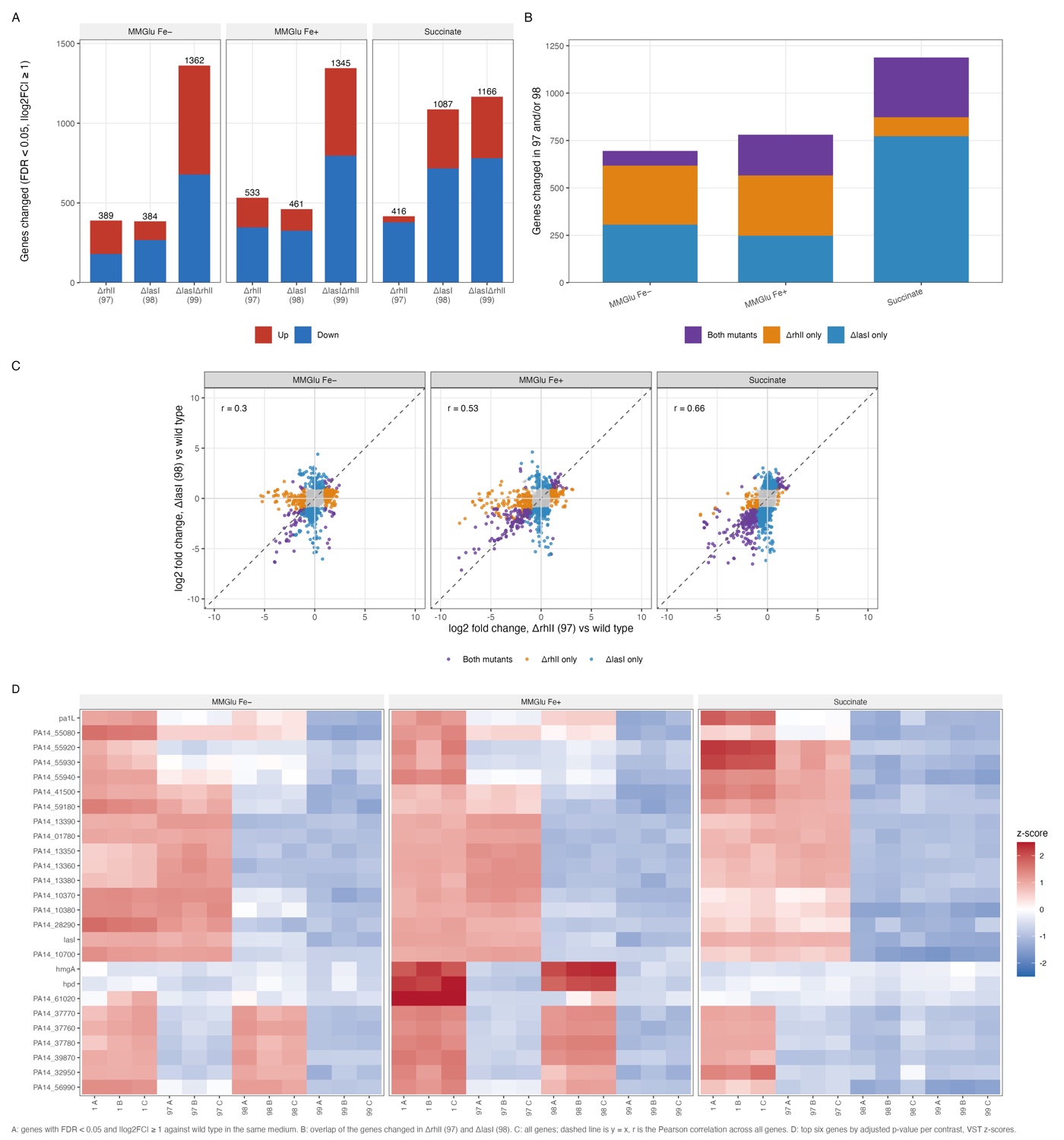
- 2 minto answer
One thing before we call this done: results/rnaseq_differential_expression.csv is 10 MB, which is too big to hand on. Keep a compact version in results/ instead — only the genes that pass FDR < 0.05 and |log2FC| >= 1, with the columns we actually read — have the script write that, remove the full table from the project, and update the notes' Files bullets to match. Don't redo the analysis.
Wrote rnaseq_differential_expression.R and rnaseq_differential_expression.csv.
- 7 minto answer
Last thing: put the project's conclusion where it is easy to find — results/summary.md, the three questions this project asked with the answer to each in two or three sentences, the key numbers, and the figure for each. Keep it short and use what we already have; no new analysis.
Wrote summary.md.
- 12 minto answer
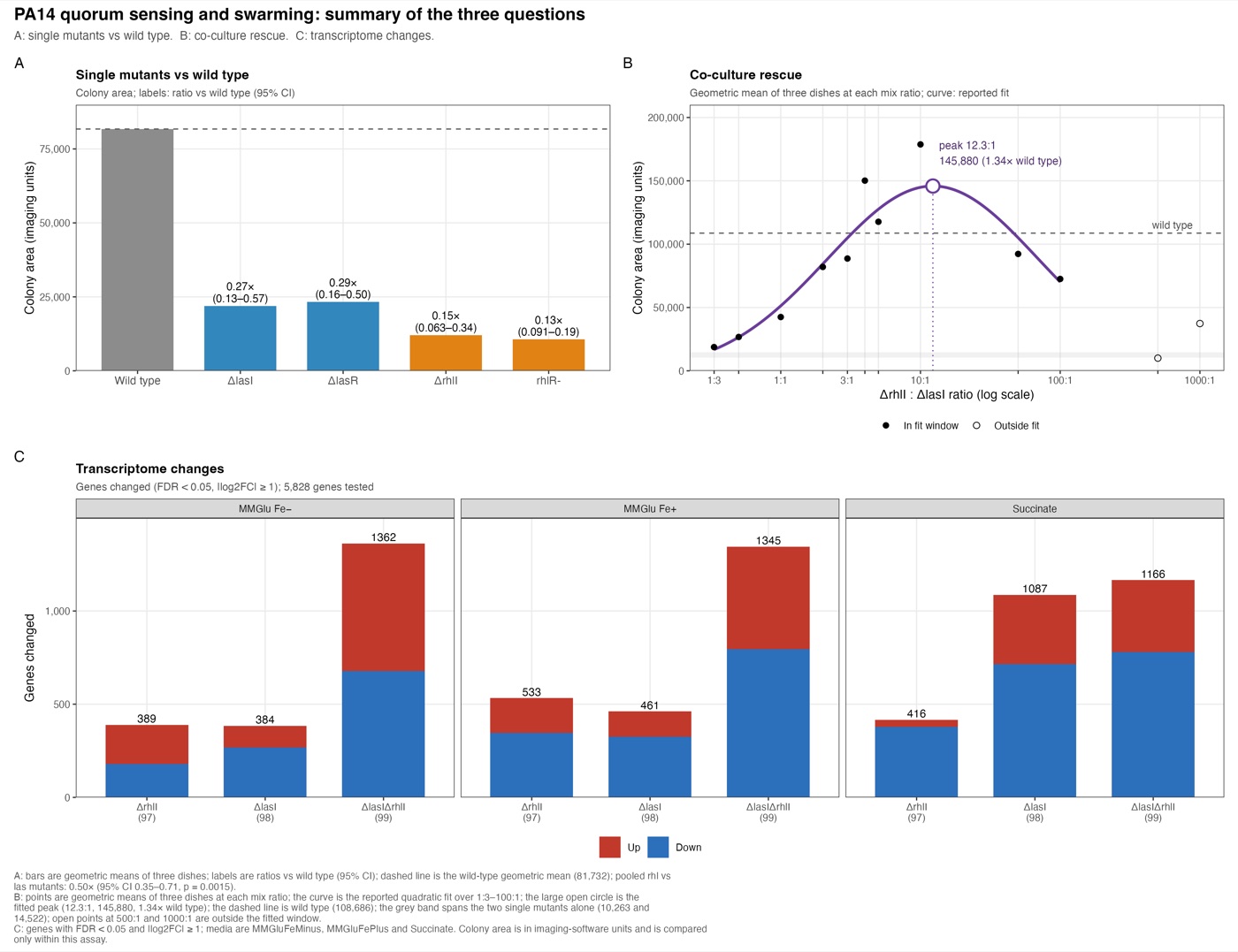
One more: draw the project's one-page summary figure in results/summary.png — three panels, one per question (mutant areas vs wild type, the co-culture ratio response with the peak, and genes changed per mutant and medium). Use the result files already in results/, no new analysis, and label it so it stands on its own.
Wrote summary.md, summary_figure.R and summary.png.
Documents. Claude Code and you work on the same code and notes. Edits keep their undo history, and saving checks whether the file changed on disk before replacing it.
Open clean.R and add a comment above each step.
Undo your last edit to notes.md.
Save notes.md, unless someone changed it on disk.
R. Claude Code can run an R script you've saved, or the version you're still editing, with the inputs and outputs you name. Each run keeps the exact code and arguments it used, so you can see what ran and find the same run again after a reconnect. Objects a script exports can be opened later without running anything again.
Run analysis.R and tell me which objects it exported.
Rerun fit.R with alpha = 0.1 and compare the estimate with the last run.
Run my unsaved edits to clean.R without saving the file first.
Tables. Tables reads CSV and JSON using declared column types, null values and stable row keys. Claude Code can page, sort and filter rows or compare two tables while keeping their source versions.
Show rows of results.csv where p < 0.05, largest effect first.
Join samples.csv and scores.csv on sample_id and list what didn't match.
How many rows in results.csv have no score?
Requirements. Claude Code checks only the R packages explicitly declared for the selected work. Preparing missing packages is a separate action that uses the project library and does not silently change the system library.
Check whether this project has the packages fit.R declares.
Install the missing ones into this project's library.
Which version of ggplot2 does this project use?
Charts. Charts binds two numeric columns from a table to a scatter plot. Every point traces to a stable row key at the selected table version, and any reduction in plotted points is reported.
Plot score against age from results.csv.
Which points have score above 2? List their rows.
Plot the same columns from yesterday's version of results.csv.
Media. Media reads the original image or PDF and its metadata. A region is checked against the selected image or page dimensions so a shared mark stays tied to that exact source.
How many pages does report.pdf have, and what size are they?
Check that the box I drew is inside page 3 of report.pdf.
Describe figures/umap.png: format and dimensions.
Agent. Agent connects an external Claude Code session to the project. It shares exact resource context and records view bindings and observed activity; conversation and the model loop stay in Claude Code.
Use the rows I shared from results.csv as context.
Which views have you opened in this project?
Show what you've done in this project since this morning.
Annotations. Comments attach to an exact code range or table entity and preserve the source version they refer to. Claude Code can read them and explicitly link a reply; making a comment available does not claim the Agent has read it.
Read my comments on clean.R and reply to each one.
List the comments in this project that have no reply yet.
Leave a note on line 42 of fit.R explaining the change.
Notebook. A live R session and a live Python session for each project, on this machine or on one of your servers. The Agent runs code in them to look at data and try things, and so can you: each cell keeps its code, what it printed, its plots and who ran it, and the session's variables stay between cells. You can interrupt a cell or stop a session; the next cell starts a new one.
Load the table in the R session and show me its columns.
Fit the model in the session and keep it, so I can look at it.
Which variables are in the Python session now?
Run R on the lab server, in ~/projects/rnaseq, and load the counts there.
Skills. Skills are how work is done in this project: the methods you chose, the conventions you keep and the traps its work ran into, kept as SKILL.md files that every Agent here reads. Your Agent records what you decide and what it learns; each change says who made it, why and from what, and you can undo it.
For this project we report proportions as percentages.
What have you learned about how this project is done?
Undo what you recorded about the frequency fits.
Console. The Console lists the commands run in a project — the Agent's, from its own reports, and yours — with how each ended, how long it took and what it printed. You can run a command in the project folder yourself, run one again or stop it. It runs only for the person at this machine.
Run the analysis script again and show me what it printed.
Which command wrote results/summary.csv?
Why did the last command fail?
Files. Files keeps references to project files and the exact bytes registered as outputs. Claude Code can read bounded parts of a file and check a run against its declared outputs.
List the files in data/ and which version of each you're using.
Check that the last run produced every output it declared.
Add figures/umap.png to this project's outputs.
Checked so far
Each line is a check that was run, not a promise. Current status
Published from the exact candidate the CI suite tested, with provenance.
The baseline. CI runs the suite and installs the packed candidate offline.
The suite and an offline install of the same candidate, on each.
The suite and an offline install; Rscript 4.5.1 checked.
Real conversations through Rho's Agent panel, including the one in the demo.
Real conversations through the same panel, with Codex's own permission modes.
Scripts, a shared Notebook session and package checks; R is only needed for R work.
Reproduced in Rho 0.5.2 by Agents working in the shared Notebook.
Use by an independent researcher has not been observed, so no usability claim is made. No Agent has yet followed the setup page from start to finish; its steps were run by hand. Literature reproductions needed several turns and many approval choices. Read the record
The install sentence
“Read https://yulab-smu.top/
Paste it into Claude Code or Codex, on the machine where your projects live.